 14 DAY TRIAL //
 One of the reasons why Gmail has become so popular in a relatively short period of time is its “user scalability,” being simple enough for even the most novice user but having enough advanced features to satisfy even the most demanding business customers, as the email client is included in Google Apps, the company's enterprise offering. No software is perfect though and the Gmail team has announced that it finally got rid of the "on behalf of" that appeared when users sent an email from an external account but using the Gmail servers.
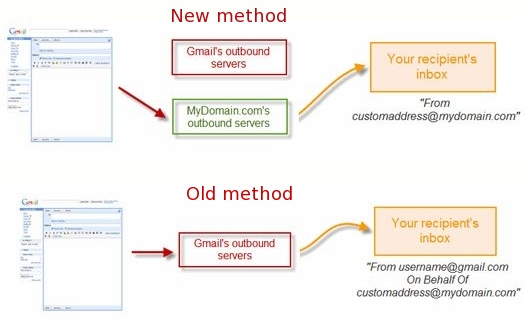
“We heard your request for another option that wouldn't show the 'on behalf of' text loud and clear, and now there's a new option that does just that. Instead of using Gmail's servers to send the message, we'll use the servers where your other email address lives. Since Gmail isn't the originating domain, we don't have to include 'Sender' info in the header. No more 'on behalf of',” Emmanuel Pellereau, Google software engineer, wrote.
Until now, those who wanted to use Gmail to handle several email accounts have been plagued with one major issue – they couldn't forward an email originating from Gmail to an external outgoing SMTP server. There was a workaround to that but it wasn't the optimal one. You could still use an external account but in some email clients the messages would show up as "From [email protected] On Behalf Of [email protected]" which many people found annoying.
The new option solves the problem by implementing a method that involves actually sending the emails originating in Gmail from the external servers thus removing the “on behalf of.” This only works if the external server supports either POP or IMAP access and the feature can be activated and edited from the settings tab under “Accounts.” However, the old method is still supported as a failsafe if, for whatever reason, the new implementation doesn't work.