 14 DAY TRIAL //
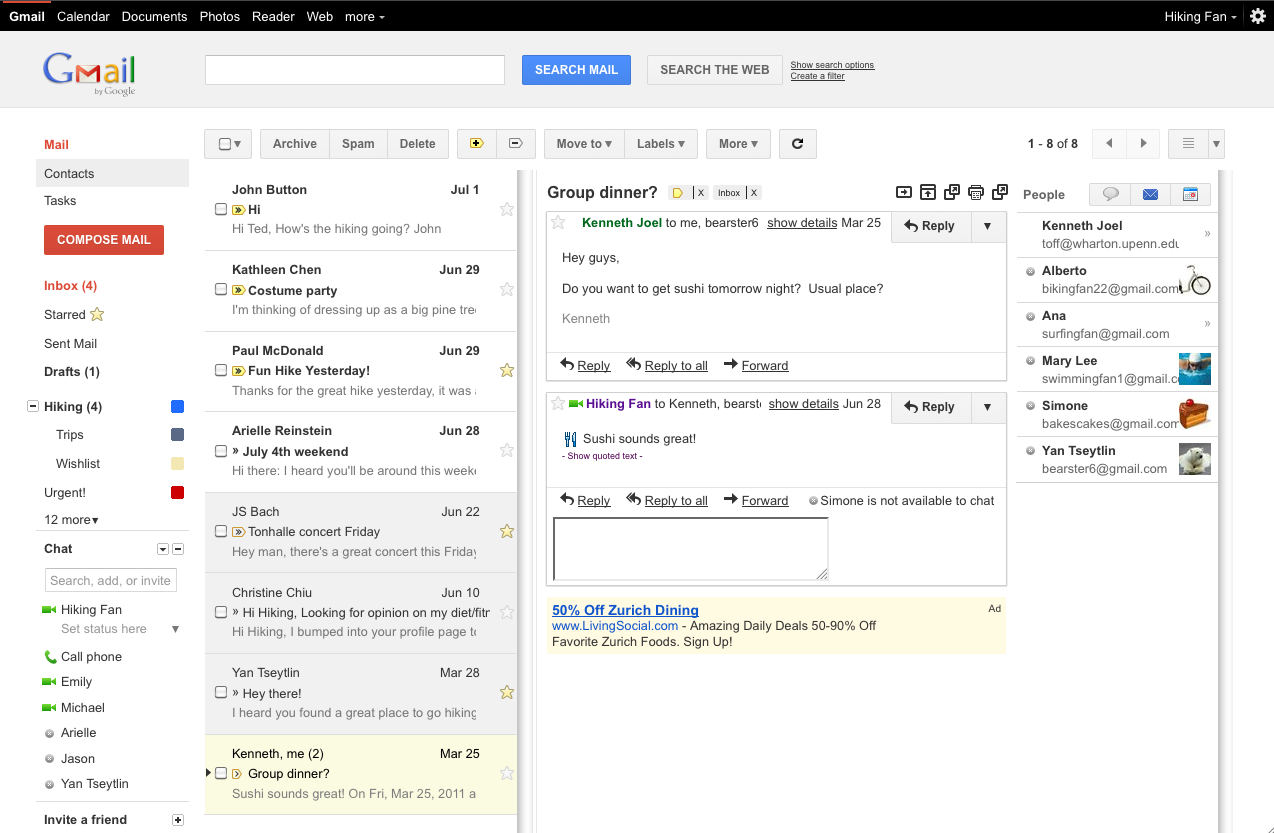
 Gmail is experimenting with an interesting new layout, there is now a preview pane option in Labs. The feature enables a two-pane view which displays the email list as well as the currently selected message in full.
There are two modes, an iPad-like vertical split and a more familiar horizontal split, used by many desktop and web-based email clients.
"When I check my email, I often rely on the message snippets to figure out which messages to open first," Maciek Nowakowski, associate product manager at Gmail, wrote.
"Sometimes, though, I want to see more than snippets, which is why I’m happy to announce that you can now preview messages in your inbox using a new feature in Gmail Labs called Preview Pane," he added.
To activate the Preview Pane feature, go to the Labs section, from the 'sprocket' menu in the top right corner, and search for the gadget.
Once you've enabled it, there will be a new button on top of the email list which will enable you to activate the vertical or horizontal split and switch between the full list view and the split view.
This way, the currently selected message will be displayed in full to the right or below the email list.
The Preview Pane views may look familiar if you've used the tablet version of Gmail. The vertical split model is becoming an increasingly popular way of squeezing two information streams or modes into the same screen. Even Twitter adopted a similar layout for its main website.
Conversely, the horizontal split view should be even more familiar, if you've used anything from Mozilla Thunderbird to the new Yahoo Mail.
Either way, the new split view is much more useful for going through a big number of email messages fast.
By default, messages previewed in the pane are marked as read after three seconds. If this doesn't work for you, you can change the time it takes for this to happen.