 14 DAY TRIAL //
 Gmail is one of the most popular email services on the web, the technology being able to work with numerous email clients compatible with most operating systems. Today, Google rolled out IMAP support which enables the consumers to control their account straight from the desktop. The IMAP compatibility is pretty different from POP3 support because every time a registered member deletes a message or marks it as spam, a similar action is applied over the email in the Gmail account. Just as if you were logged in through you browser.
"Unlike POP, IMAP offers two-way communication between your web Gmail and your email client(s). This means when you log in to Gmail using a web browser, actions you perform on email clients and mobile devices (ex: putting mail in a 'work' folder) will instantly and automatically appear in Gmail (ex: it will already have a 'work' label on that email)", Google mentioned in the help manuals of the IMAP support.
At this time, Gmail's IMAP is able to work with Outlook Express - Windows, Outlook 2003 - Windows, Outlook 2007 - Windows, Apple Mail, Windows Mail, Thunderbird 2.0 and some other email clients which are able to work with Gmail settings. "Please note that every client handles IMAP in a slightly different way. If you're curious about the specific use of your client, please contact the client's support team."
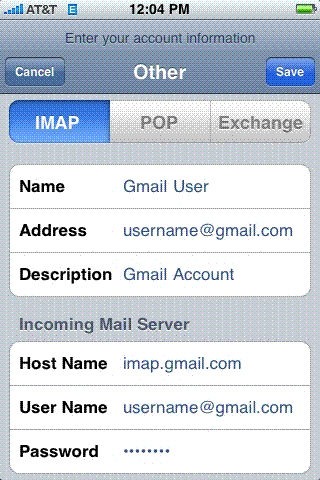
So, supposing you want to configure your iPhone to work with Gmail's IMAP function, follow the next 7 steps, all of them provided by the Mountain View company.
1. Enable IMAP in your Gmail account settings. 2. Tap Settings. 3. Tap Mail. 4. Tap Add Account. 5. Tap Other 6. Make sure that: The IMAP tab is highlighted; Host Name is imap.gmail.com; User Name is your full Gmail address, including '@gmail.com' 7. Save