14 DAY TRIAL //
 The debate over HTML5 video versus Flash video has died down this year and, yes, Flash video is still prevalent. But that doesn't mean that there's nothing happening on the HTML5 side, quite the contrary.
Firefox has been making a steady stream of improvements to the HTML5 player, many are in the pipeline, i.e. in Aurora or Beta, and several more are planned.
Already in Firefox 8, the one that most people are running, the HTML5 video player has several useful new features. Clicking on the video toggles between play and pause, for example. Seeking is also accurate to the microsecond.
In Firefox 9 Beta, new controls for small video windows have been introduced, useful for small embedded videos.
There is also a better interface when watching a stand-alone video, i.e. there's no other content around it, there's a dark gray background surrounding it and the video window has a dropshadow.
But the most interesting additions are in Firefox 10 Aurora. Videos can now go full screen, one of the big drawbacks, so far, of HTML5 video.
This has been one of the biggest things people have asked for and, with the full screen API, HTML5 video can do pretty much everything that Flash video can.
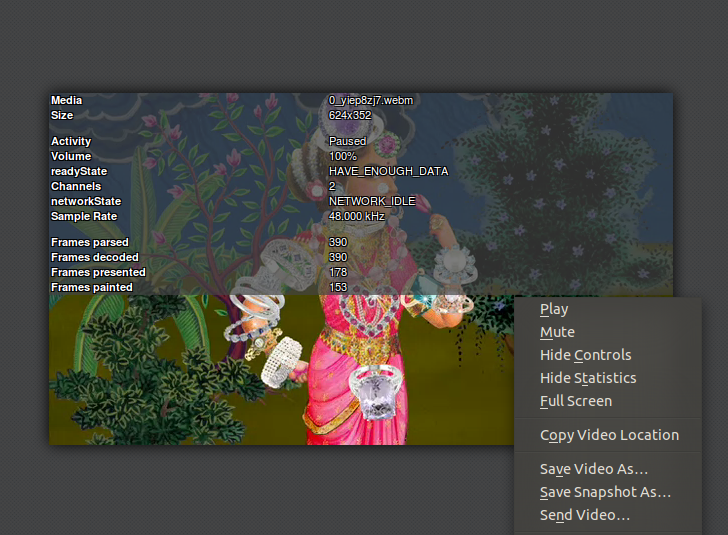
There is also a new statistics overlay. Right-click on the video and select "Show statistics" to see it. It comes with all manner of useful data, the video format, the original and scaled size and so on.
An interesting new feature is the ability of saving the current frame in a video as an image via the "Save snapshot as..." menu entry.
Things are even better in the Firefox 11 Nightly, there is also a full-screen button added to the controls, to both advertise the fact that videos can go full-screen and to make it easier to do so.
Moving forward, Mozilla developers plan to add a large "Play" button on top of videos which haven't started playing, just like YouTube videos have. The media controls will be getting a visual revamp. Finally, watching a video in full screen should disable screensavers from loading.