 14 DAY TRIAL //
 Developed by Custom Solutions of Maryland, Speed Reading allows users to measure their reading speed, and to use different methods to increase it, as well as improve comprehension. The latest iteration of the app, released earlier this year, enhances Leopard support.
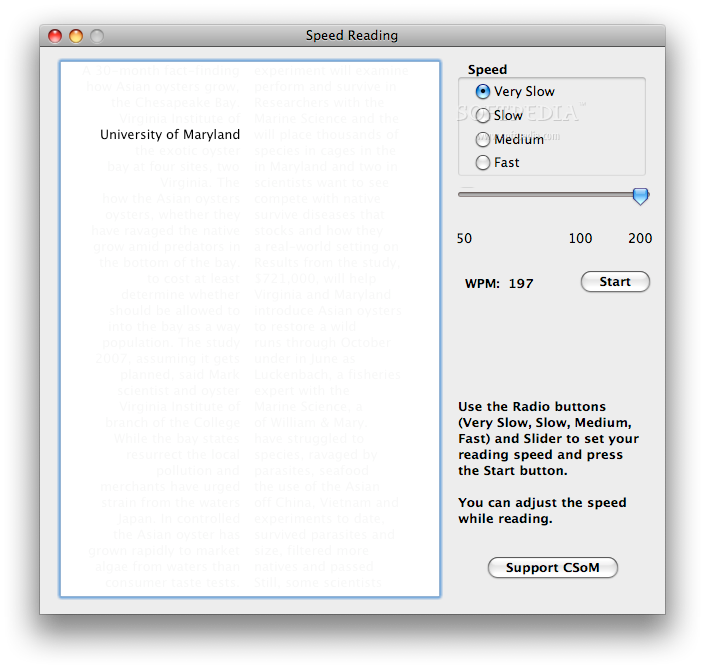
Speed Reading III offers ten built-in practice texts. Reading speed can be adjusted from approximately 200 words per minute to 1,500 words per minute by using three radio buttons (slow, medium and high) and a slider, while the approximate speed (words per minute) is displayed. Comprehension, however, is not tested. Only you can know what you've understood and what you haven't. It would be nice, however, if future versions of Speed Reading would include a comprehension test as well, telling the user to sum it all up in a few “key” words. On the downside, it would probably only work once per test, but at least you'd get your answer.
So, here's how it works. Speed Reading displays a text behind a moving window, sort of like a slideshow, but with words. The average reader reads about at 200 words per minute, with a typical comprehension of 60%. The top 1% of readers does much better, reading at more than 1,000 wpm with a comprehension of 85%, according to the makers of the app. Such high-speed reading requires serious concentration, but the good thing about it is that it lets you try reading by looking at two midpoints on each line and continuing to move forward without going back and re-reading.
As noted above, ten text sources are included. Users also have the option to choose their own text source, of course.
Note: because the application stops reading a text source upon encountering an empty line, remove empty lines when preparing to use your own text source. Also, if the text source is longer than can be contained by the window, you will see only the amount that fits into the window.
You can download Speed Reading III (version 1.2.1) here. Give it a try and tell us if it did you any good. The utility is a Universal Binary, good for both Intel and PPC machines. It requires Mac OS X no higher than 10.2. Later versions of OS X are, of course, compatible with Speed Reading III. Thumbnail image credits: musicforchange