 14 DAY TRIAL //
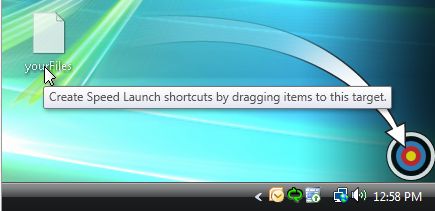
 Speed Launch is an application designed to deliver a breath of fresh air to the process of launching mundane and repetitive tasks in Windows, offering a high level of flexibility in comparison to what is available by default with the operating system. The product of a collaboration between Matt Dyor, a patent attorney working with Microsoft?s Server and Tools Business, and David Craig, a support escalation engineer with Microsoft Office Delta Force team, Speed Launch will centralize all the shortcuts thrown at it (actually dragged and dropped), and will classify and then launch them in accordance with keywords that the end users will set up.
"Speed Launch lets you open anything you use frequently in seconds. Just take the "thing" (document, program, or website), drop it on the bull?s eye, and then give it a name that appeals to you. To open it any time later hit "Windows Key + C" and the launch window will open. You just type the name and hit enter. It?s that simple," Dyor stated.
Speed Launch is hosted over at Microsoft Office Labs, an initiative from the Redmond company which deals with experimental, research and prototype software from all Microsoft employees. Speed Launch is available as a free download, and there are no indications that the Redmond giant is looking to commercialize the application, or to include it into Windows. Initially a Windows Vista Sidebar gadget, Speed Launch has grown to a fully-fledged desktop application, and can also be integrated on Windows XP.
"We are hoping that Speed Launch?s use of the drag and drop interaction model will make this powerful functionality more intuitive to everyone, especially new users. If it does or doesn?t please let us know! We have kept Speed Launch pretty basic, both because of the limited resources we have and because we want to see where we should invest our energy based on what people (e.g., you) want. If you have an idea for something you would like to see, please suggest it and maybe we?ll find a weekend to build it," Dyor added.
Speed Launch is available for download here.