 14 DAY TRIAL //
 Twitter is going back to its roots with a new ‘follow by SMS’ feature. Anyone in the US can now use the Fast Follow feature to start following any Twitter user by sending a text message. You will then receive tweets from that user via SMS and the best part is that you don’t even need a Twitter account to do this.
“Anyone in the US can receive Tweets on their phone even if they haven’t signed up for Twitter. This is a simple way for people to get information they care about in real-time,” Twitter announced in a blog post.
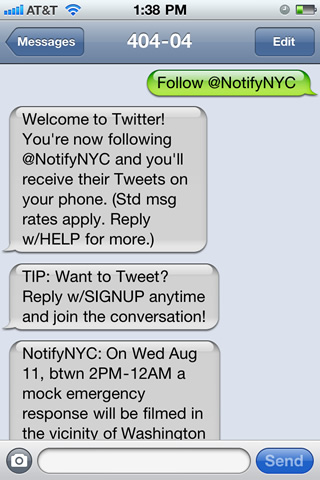
“For example, let’s say you want to get Tweets from New York City’s office of emergency management (@NotifyNYC). Just text ‘follow NotifyNYC’ to 40404 in the US,” the post explained.
SMS’ have always been a part of Twitter, the service started out as being a sort of ‘mass’ text message system. In fact, the 140 character limit comes from Twitter’s SMS roots. Text messages are limited to 160 characters and Twitter used the remaining 20 to display the username.
What’s new with Fast Follow is the possibility to get started using Twitter without an account. If you see a Twitter account you’d like to get updates from, just pull out your phone and send a message.
The hope is that it will get people hooked on the idea and they’ll eventually sign-up for the full service. Twitter is making this easy to do on your phone as well, just text ‘signup’ to Twitter.
The feature is only available in the US for now, but Twitter says it’s working with carriers elsewhere to introduce it in other countries as well.
Twitter is also introducing a way of getting text messages with updates from any user on the site as well. A new “phone button” in hovercards will enable users to subscribe to another user’s tweets via SMS. You can stop receiving the text messages by sending ‘off’ to Twitter and turn them back on by sending ‘on’.