
Softpedia
 

NEWS CATEGORIES:


NEWS ARCHIVE >>
SOFTPEDIA REVIEWS >>
MEET THE EDITORS >>
Home > News > Microsoft > Windows Software

September 6th, 2010, 17:34 GMT · By

Firefox 4.0 Beta 6 UI Evolution Brings All-in-One Go Stop Reload Button

SHARE:

Adjust text size:


Firefox
Enlarge picture
Mozilla is by no means done with the graphical user interface overhaul for the next iteration of its open source browser.

And although all the major elements of the UI redesign are already in places, additional changes still need to be introduced in future Beta development milestones of Firefox 4.0.

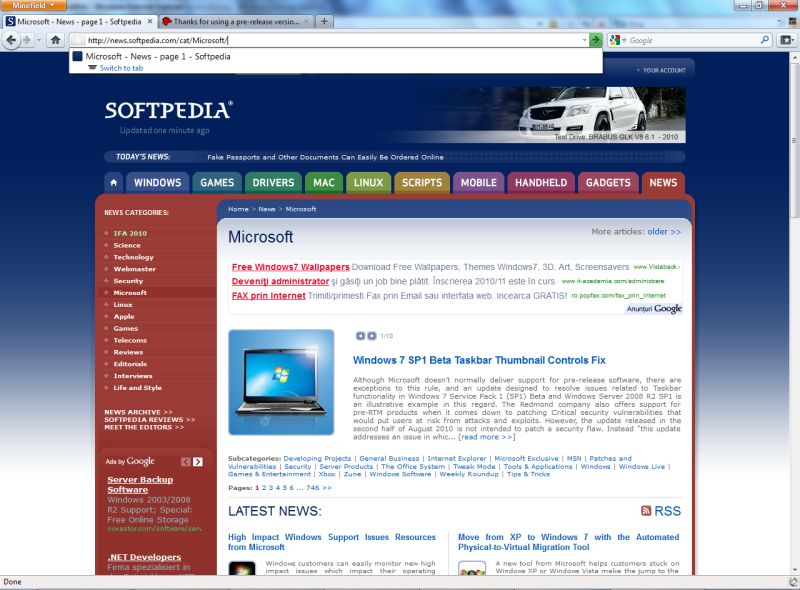
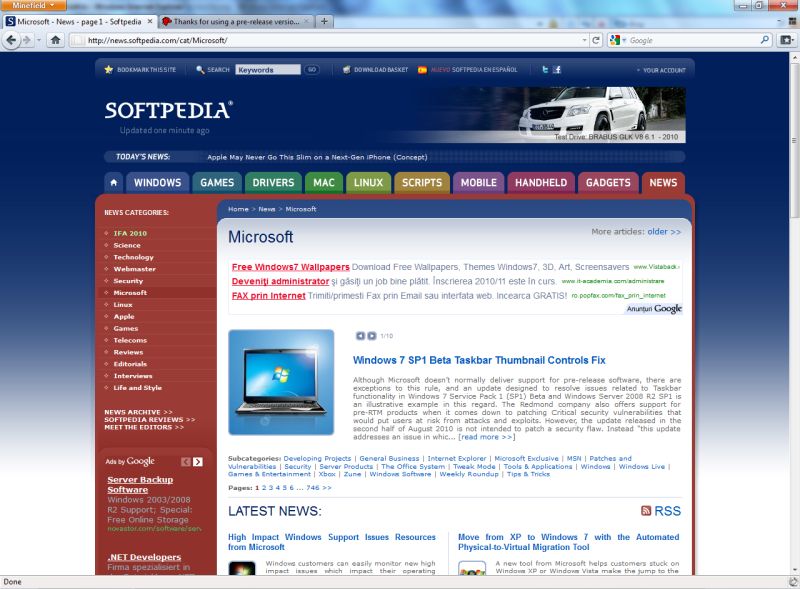
Case in point: the new all-in-one Go Stop and Reload button which will be introduced in Firefox 4.0 Beta 6, at least, according to the early development preview of the upcoming release.

In the screenshots included at the bottom of this article, users will be able to see the difference from an older version of Minefield (the project preceding Firefox), and the latest Build, which is a sneak peek at Firefox 4.0.

The new all-in-one Go Stop and Reload button can be spotted at the end of the Address Bar (Mozilla Links came across this first.)

Early adopters that followed the development process have undoubtedly already noticed that Mozilla has moved the Reload/Stop button from the left hand side near the Back button, all the way on the right of the Address Bar.

Now the browser vendor has taken the UI redesign one step further, and provided an unified button that tailors itself contextually to the actions of the users.

The same button can be used to navigate to a website, stop the loading process or reload content.

But in all fairness, the major changes synonymous with the Firefox 4.0 UI revamp are complete, with Mozilla left to put the finishing touches on the next version of the open source browser.

The new All-in-One Go, Stop and Reload button will be introduced in Firefox 4.0 Beta 6.

However, Mozilla still has to deliver Firefox 4.0 Beta 5, which is scheduled for availability this week. Mozilla expects Firefox 4.0 Beta 6 to be the feature freeze.

Firefox 4.0 Beta 4 for Windows is available for download here.

Firefox 4.0 Beta 4 for Mac OS X is available for download
here.

Firefox 4.0 Beta 4 for Linux is available for download
here.
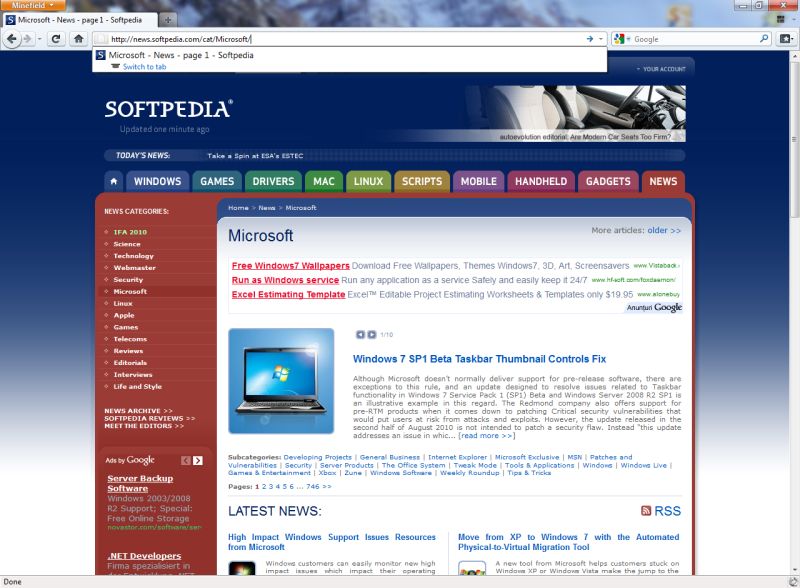

Minefield
Enlarge picture
Firefox 4.0 pre-Beta 6
Enlarge picture
Firefox 4.0 pre-Beta 6
Enlarge picture
Firefox 4.0 pre-Beta 6
Enlarge picture


FILED UNDER:
Firefox 4.0
Beta 6
UI

TELL US WHAT YOU THINK:

9,226 hits · 7 comments · Link to this article · Print article · Send to friend · Subscribe to news

MUST-READ RELATED ARTICLES:


Download Firefox 4.0 Beta 5 Next Week, Beta 6 to Be Feature Final

IE8 Is Killing IE6 and Outpacing Chrome 5.0 and Firefox 3.6

Firefox 4.0 Feature Freeze Delayed to September 10

Some Firefox 4.0 UI Elements and Features Could Be Killed

Download Firefox 3.6.9 Beta and Firefox 3.5.12 Beta

READER COMMENTS:


Comment #1 by: devlo on 06 Sep 2010, 17:53 UTC reply to this comment

it is cool


Comment #2 by: Skynet on 06 Sep 2010, 19:56 UTC reply to this comment

What kind of morons are these humans? We DO NOT need all in one buttons. We want a simple, easy to use GUI like the one of VirtualDub or uTorrent. And we DO NOT need useless features such as TabCandy. We want the existing features to work. We want features that makes the browser safer like the NoSript or FlashBlock addons. Do you copy, morons?


Comment #3 by: Cyryl on 06 Sep 2010, 20:09 UTC reply to this comment

"Mozilla is by no means down with the graphical user interface overhaul for the next iteration of its open source browser. "

So...in other words, Mozilla does NOT support it's own GUI?

LOL!

Comment #3.1 by: Marius Oiaga on 09 Sep 2010, 07:40 GMT

Thank you!


Comment #4 by: dmbania on 07 Sep 2010, 11:18 UTC reply to this comment

This is nothing new. I remember some long-gone version of Netscape/Mozilla having this feature in milestone builds only to be removed at some point - either the final build or the following release.


Comment #5 by: TravisO on 07 Sep 2010, 13:36 UTC reply to this comment

Combining the Stop and Refresh buttons is an easier GUI. 99% of the time, you can only perform one action or the other, not both. The buttons are pretty much related and I prefer combining then.

Comment #5.1 by: James on 12 Sep 2010, 20:44 GMT

exactly that is the idea here!! also wish we could remove the search bar to make it into like a omnibar and also finish off with old age status bar

Copyright © 2001-2012 Softpedia. Contact/Tip us at

WindowsGamesDriversMacLinuxScriptsMobileHandheldNews

SUBMIT PROGRAM   |   ADVERTISE   |   GET HELP   |   SEND US FEEDBACK   |   RSS FEEDS   |   UPDATE YOUR SOFTWARE   |   ROMANIAN FORUM