 14 DAY TRIAL //
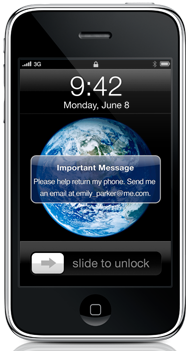
 Under the Mac section of its website, Apple explains that there’s a new feature to be had with its cloud-based service come June 17, when iPhone OS 3.0 is released. Apple has developed a way (more than one, actually) for the user to interact with his / her iPhone, even if the device gets lost, or stolen.
“Find My iPhone” is a new feature between iPhone OS 3.0 and MobileMe. While not active yet (since the 3.0 software update is yet to be released), Apple claims it works like a charm in finding one's phone’s whereabouts, wiping the device clean, or sending a text message that its finder can read.
“MobileMe helps you find your lost iPhone. Sometimes it’s your keys. Other times it’s your glasses. Misplacing things happens all the time. Now, if you misplace your iPhone, Find My iPhone can help you find it,” Apple says. The company continues by explaining exactly how Find My iPhone can locate one's device on a map.
“Now, if you lose your iPhone, MobileMe can help you find it. MobileMe includes a new feature called Find My iPhone. Just enable Find My iPhone in MobileMe settings on your phone. Then you can log in to me.com from any computer to access Find My iPhone and display your phone’s approximate location on a map,” Apple pinpoints. The Mac maker then goes to provide a scenario, for a better understanding of how the new feature can help iPhone 3.0 users.
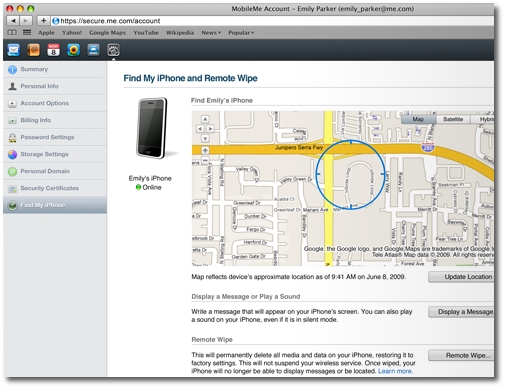
“Say you’ve just used the Find My iPhone feature, and it turns out your phone is at the doctor’s office. Not to worry. You can write a message that will be displayed on your iPhone — something like, ‘Oops! Left my iPhone behind. Blame it on the cold medicine. Be there ASAP to pick it up. Your grateful patient, John Appleseed.’ Your message appears on the screen, even if your phone is locked. And if the map shows you that your iPhone is nearby, yet you still can’t find it, you can tell MobileMe to play a sound that overrides the silent setting on your phone,” Apple explains.
But there’s also that worst-case scenario where your iPhone gets (you guessed it) stolen. Texting your thief isn’t likely to get your iPhone back, so what better solution to secure your private data if not Remote Wipe?
“Addresses, phone numbers, email, photos. Your iPhone contains important and personal information — information you probably don’t want in the hands of a stranger,” Apple stresses. “So if you lose your iPhone and displaying a message on it hasn’t resulted in its safe return, you can initiate a remote wipe to restore it to the factory settings,” the Mac maker shares.
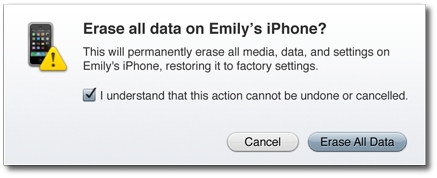 Example: remotely wiping your iPhone so that your information doesn't fall in the wrong hands
Credits: Apple
Example: remotely wiping your iPhone so that your information doesn't fall in the wrong hands
Credits: Apple
The best thing is that, if your iPhone does turn up eventually (which is not likely, but we’re stressing this for the sake of the argument), you can easily restore it from your most recent backup using iTunes. You do regularly backup your iPhone, don’t you? If not, you should.
So, how useful do you think Find My iPhone is going to prove? Which of these functions would you use first, should your iPhone get stolen?