
Softpedia
 

NEWS CATEGORIES:


NEWS ARCHIVE >>
SOFTPEDIA REVIEWS >>
MEET THE EDITORS >>
Home > News > Security > Spyware Threats

May 22nd, 2008, 13:15 GMT · By Bogdan Popa

Fake Windows XP Security Center in the Wild

SHARE:

Adjust text size:


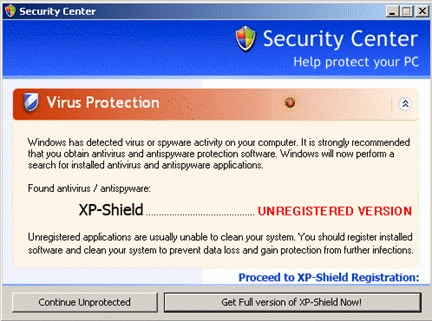
The fake Windows Security Center
Enlarge picture
Back in the past, we saw a huge number of rogue anti-spyware technology which did nothing than to misinform users and trick them into buying
unneeded security solutions. Today, a similar scam has been reported by security company Panda Software but, in comparison with the previous attacks, this one relies on a Windows function closely related to security. The Adware/XP-Shield poses as a Windows security center which usually informs you about the status of the security applications on the Windows workstations.

However, this piece of malware misinforms users that their computers are infected and, just like many other rogue anti-spyware products, it asks them to buy a certain security product. Only that buying the product does nothing to the computer because all the attackers want is to actually steal your money.

Once installed on the computer, the malware displays pop-up windows every once in a while, notifying users about the existence of an infection. If the user chooses to continue "unprotected", the application stays in the background and minimizes the window to System Tray.

"It is possible that while we are visiting different websites, several popups are displayed informing us that our system is infected or that our computer is not working properly and in order to solve these problems they recommend us to purchase a certain program. Be careful with this type of software, which will not really solve the problem and will make you lose money," it is mentioned in the Panda Software security advisory.

The malware can be easily identified by the name of the executable files, XPShieldSetup.exe, and by the fact that it drops a shortcut on the Desktop and in the Start menu. The infection only affected the Windows machines, including here Windows 2003, Windows XP, Windows 2000, Windows NT, Windows ME and Windows 98.

TELL US WHAT YOU THINK:

68,997 hits · 36 comments · Link to this article · Print article · Send to friend · Subscribe to news

MUST-READ RELATED ARTICLES:


Fake Anti-Spyware for Windows Reaches the Web

AlfaAntivirus - The Worst Antivirus You Can Get!

Famous Websites Serving Windows Infections

Do NOT Buy Rogue Antispware Even If You're Infected

VirusProtect Doesn't Actually Protect Your Computer

READER COMMENTS:


Comment #1 by: Ole Andersen on 29 Jun 2008, 14:36 UTC reply to this comment

how about telling us how to remove it :S i cant find or remove the popup

Comment #1.1 by: Abdalla on 30 Aug 2008, 15:17 GMT

Microsoft Window defender did it for me. I had hard time down loading it from Microsoft web site. You have to keep on trying since XP security center will keep on popping up. Do net respond to any of the options that will show from XP Security center, use back click. It took me over 15 minutes to do it. Good luck.


Comment #2 by: Rin on 09 Jul 2008, 20:56 UTC reply to this comment

I do I remove this from my computer? I have anti-spyware that can't get rid of it on it's own.


Comment #3 by: chris on 21 Jul 2008, 05:16 UTC reply to this comment

thanks for stating the obvious, now how do i remove this annoying thing?


Comment #4 by: Nick H on 23 Jul 2008, 11:39 UTC reply to this comment

Has anyone found how to remove this yet?


Comment #5 by: hfunkytown on 24 Jul 2008, 04:04 UTC reply to this comment

Windows Defender will remove it.
http://www.microsoft.com/windows/products/winfamily/defender/default.mspx


Comment #6 by: Angela on 25 Jul 2008, 19:24 UTC reply to this comment

I got the XPsecuritycenter rogue anti-spyware on my computer a few days ago. This may be a newer version than what this article's talking about. It proved to be a little tricky to remove. When it downloaded onto my PC, it closed my browser, rebooted my PC and disabled both Spybot Search and Destroy and SUPERantispyware (both legit freeware) which I already had and which were working fine until this nasty got on my PC. So I had to purchase PC Tools Spyware Doctor (online version). That removed it. But note: If you get Spyware Doctor you'll need to run a full scan in safe mode to completely remove XPsecuritycenter, because it's a self-reinstalling program. Also be sure to delete all temporary internet files before running the scan. Be aware that there's a version out there that seems capable of disabling some currently installed legit anti-spyware programs.


Comment #7 by: Jay on 27 Jul 2008, 17:56 UTC reply to this comment

Defender will not completely remove it, at least not for me.
Maybe if i do a complete scan and first clean out my temp internet folder, that might do it.
Whenever I boot up, this XP Shield crap pops up, so I click ctr-alt-del right away, find ht XPSecurity in task manager and stop ti.
At least i get my browser back , but I still get those pop ups , just ignore them they go away.


Comment #8 by: grrrr on 28 Jul 2008, 20:09 UTC reply to this comment

I have a similar problem only it installes a program called XP Security Center 2008. I've found some odd files and such in windows folders, i've deleted them, but they come back. I seriously doubt buritos.exe is a system file. some other files i've deleted, but come back, are braviax.exe, buritos.exe, D0B4.tmp, blphcj12j0e5u4.scr, pphcj12j0e5u4.exe, and eqyq.scr.

some things i've noticed is that i can't change the desktop background, the tab for it just isn't there! the Red X that pops up on the task bar with the popups saying im infected, etc, etc.


Comment #9 by: xkingrid on 13 Aug 2008, 15:32 UTC reply to this comment

ive repeatedly search google about this threat and nothing comes as a solution to completly remove this insanity.

to temporarily disable popping up the notification,

just end the explorer from the task manager.
then "new task" type in explorer.

then voila, the madness of notification ends.

pls post permanent solution if you have.thanks and more power


Comment #10 by: Richard on 14 Aug 2008, 13:20 UTC reply to this comment

All I did was search 'XP Security Center' in google and the first hit gave me a site with manual removal instructions. I've ran into this problem, as well as similar problems (Vista security center and the other one like it) a few times before and found that the manual removal works best. Do it in safe mode and always back your registry before you modify it!

Richard


Comment #11 by: Ronnie on 02 Sep 2008, 20:14 UTC reply to this comment

Hi All,
hope this helps. I downloaded a programme called Highjack this, ran it and watched the process running. each time the fake xp security centre appeared it came up as mnetedkp.exe.
It can be found in c:windowssystem32mnetedkp.exe.
I manually deleted the file. since doing this the pop has not come back.
Hope this helps a few of you. good luck Ronnie


Comment #12 by: Yves on 04 Sep 2008, 06:31 UTC reply to this comment

This XP Security Center came to me as an attached file which I thought was an order from a customer. So I clicked on it and within 30 seconds my pc had shut down. I restarted it and noticed that there were pop ups about infections and how I can remove them by buy XP Security Center. I followed the procedure to see where it leads me and saw in the payment form that this so called "Windows" program was based in Russia and there was an option to pay in Roubles.
Now my problem is that this nasty piece of work wont let me browse the internet. I am writing this from another pc.

I would like to know how I am going to remove that thing safely and securely, knowing that it wont let me browse the net to download Defender or whatever else is out there to get rid of it. Please let me know if you have suggestions. Thanks


Comment #13 by: Paul on 04 Dec 2008, 14:59 UTC reply to this comment

I used MalWareBytes, ran it, deleted the found nasties, restarted, ran it again, deleted the new nasties (does this thing reside in RAM, too?), and continued to reboot, run, delete until I got a clean bill of health. Then had to reset up my legit security, anti-viral and firewall settings that had been altered by this infection. McAfee did nothing to protect me from this. Screw MS, I'm ebaying this box and getting a Mac. I'm done with this nonsense.


Comment #14 by: Frank on 28 Dec 2008, 17:35 UTC reply to this comment

Can anyone give more detailed instuctions on how to delete this thing manually because my limited internet accesses due to this virus wont let me download anything that can take it off


Comment #15 by: sam baker on 26 Jan 2009, 23:18 UTC reply to this comment

Thanks for the postings. I just removed XP Security Center virus with malwarebytes antimalware 1.33. worked great!


Comment #16 by: jojel on 09 Feb 2009, 14:43 UTC reply to this comment

ffs this is annoiying thingi it popups all the F***** time :S i have tried all thouse ways but it just wont help i tried to destroy it with spybot and may other thingies but i cannot remove it it says that spywares cannot be removed becuase they are still running (in the memory) :S:S:S:S please help me im pissing my pants here :D


Comment #17 by: Wolf on 15 Feb 2009, 22:56 UTC reply to this comment

I`m an I.T. tech in the field and also tryed Malware bytes and the like but in the end had to reformat the HD! not sure what version of this worm it was but i remember seeing an alert that it was a self replicating Trojan!... once it gets in the registry then it`s bye,bye data. I think it depends on the version and how it lives that matters, Iv`e also heard of success with this removal tool.


Comment #18 by: Micky H on 24 Nov 2009, 10:44 UTC reply to this comment

I have vista on my PC and i also got this sercurity thing come on.Tried alsorts to remove it.In the end i restarted PC in safe mode and went to system restore.I used it and have had no further problems. I did have to re download Macafee though. This is normal anyway if you have to use system restore. Cost nothing. Hope this helps.


Comment #19 by: al on 03 Dec 2009, 07:12 UTC reply to this comment

My roommate has a seriously nasty version of this XP Security Canter nonsense, it blocks the task manager, wont let me run any of the anti-malware programs described in posts as a fix, and I get a nasty blue screen (not of death) when I try and start it in safe mode. I'm afraid might have to reformat the whole damn thing! Anybody have any of these issues or got anymore solutions? sure am glad im writing this from my trusty mac! (knock on wood).

Comment #19.1 by: K.K. on 10 Dec 2009, 02:30 GMT

#19, my husband has XP on his desktop. I was able to use safe mode to clear up this problem, although it DID require physically disconnecting the power cord and THEN rebooting, and doing a system restore to an earlier date, it seems to have worked.

Hubby's computer said "welcome" for a very long time, but 4 boots and re-boots later, it seems to be working.

Hope this helps you!


Comment #20 by: K.K. on 10 Dec 2009, 02:16 UTC reply to this comment

#19, my husband has XP on his desktop. I was able to use safe mode to clear up this problem, although it DID require physically disconnecting the power cord and THEN rebooting, and doing a system restore to an earlier date, it seems to have worked.

Hubby's computer said "welcome" for a very long time, but 4 boots and re-boots later, it seems to be working.

Hope this helps you!


Comment #21 by: Jim on 10 Mar 2010, 05:33 UTC reply to this comment

I got the XP security messages and now I cannot access any programs. I get windows cannot access this evice, foler or file. You may not have appropiate permission to access the item


Comment #22 by: Chandra on 15 Mar 2010, 17:54 UTC reply to this comment

I've had this for about a week on my second computer, and it was intolerable! My BIL was going to come re-format it for me, but he can't come until later this week, and suddenly yesterday the virus seemed to disappear...I can access everything again, I'm not getting any pop-ups, it's just back to normal. Does it maybe burn itself out after a week if you just ignore it or close the windows every time it pops up?


Comment #23 by: Graeme on 29 Mar 2010, 14:21 UTC reply to this comment

I had this exact virus.

Easy way to get rid of it.

Download 'Spyware Terminator'. Its free.

Got rid of everything after one run.

Note: I found that if you right click on your Spyware/Virus programs etc and run them it bypasses XP SECURITY CENTER not allowing you to open them.

You should have an option to 'Scan with ' etc

Hope this helps


Comment #24 by: unforsaken1421 on 30 Mar 2010, 02:34 UTC reply to this comment

try system restore several times it may or may not work. First time i restored and hit apply at 12% it disapeard.Then i restarted and it was back.keep system restoring hope this helps it p!ssd me off ty


Comment #25 by: Diane on 17 Apr 2010, 23:55 UTC reply to this comment

Hi, thanks for update, just hit with XP Security Tool 2010 today, can't do anything on computer. Managed to run full computer scan with AVG, detected nothing. Read note above re spywareterminator, the problem is, when I google search it, it says, internet explorer alert. Visiting this site may pose a security threat to your system. I can't access anything. Please help, I am not an expert either, so don't really know how to access safe mode, have heard of it, can follow simple instructions............plz


Comment #26 by: AH on 20 Apr 2010, 14:15 UTC reply to this comment

Im running Windows defender as I type, hehe. I hoe it kicks it out, cause this is annoying! I cant even open AVG or Malware Bytes but I also ran the Windows Malicious Software Tool and in the quick scan came up with nothing. So i hope this gets it out.


Comment #27 by: GT on 22 May 2010, 09:03 UTC reply to this comment

Combofix will fix this - dad's Pc had issue... download combofix from bleepingcomputer


Comment #28 by: Paparoni on 02 Jun 2010, 20:22 UTC reply to this comment

Kaspersky is the best one


Comment #29 by: DP on 21 Jun 2010, 20:13 UTC reply to this comment

dont tell people to download when you can clearly read that they can not get onto the internet! Thats just annoying


Comment #30 by: JCB1888 on 11 Sep 2010, 20:15 UTC reply to this comment

GIRLFRIEND JUST GOT THIS FAKE SECURITY CENTRE PROBLEM ON WINDOWS VISTA COULD NOT OPEN ANY PROGRAMS EG TASK MANAGER,AVG AND WINDOWS DEFENDER.GOT A PROGRAM OFF NEOSMART SITE WINDOWS VISTA RECOVERY ITS AN ISO IMAGE BURNED TO DVD AND IT REPAIRS OR REINSTALLS VISTA ASKED IT TO REPAIR AND IT RESETS COMPUTER TO A PREVIOUS DATE THEN RAN AVG FOUND MANY INFECTIONS AND TROJANS AND REMOVED ALL WOULD RECOMMEND THIS SITE .


Comment #31 by: Steve on 06 Apr 2011, 15:20 UTC reply to this comment

For anyone else still struggling with this virus, look here and follow the steps. You may need an uninfected PC to download the required tools to eradicate this pesky Trojan. http://www.bleepingcomputer.com/virus-removal/remove-antivirus-system-pro

Tools you will most likely need:

rkill - This kills the process that prevents you from opening other files or installing antivirus software.

tdsskiller - This will completely clean all of your temp folders where remnants of malware like to hide.

Malwarebytes - After running rkill and tdsskiller you should be able to install Malwarebytes and run a complete scan, removing anything it finds.

After these steps and having a read through the link above you should be rid of the rogue security center malware.


Comment #32 by: uranio255 on 25 Apr 2011, 09:45 UTC reply to this comment

I used "SpyBot Search


Comment #33 by: moe on 25 Apr 2011, 12:38 UTC reply to this comment

how can i get rid of ap security from mu computor once it is there


Comment #34 by: Joe Bloe on 01 Jul 2011, 13:31 UTC reply to this comment

I think it resides in pagefile.sys as well.

I had pagefile referenced to seperate HDD on second IDE to tweak system speed.

When I got the infection I hit reset button immediately (crashing the system but saving documents).

Tried to reimage XP OS and just write over the infected install.

Kept getting boot error message to the effect "missing / corrupted file WINDOWS/SYSTEM32/CONFIG/SYSTEM" message and new image would stall in DOS.

Know the backup image was OK because had used it previous day( its a non incremental backup and keep dual copies of backup image on 2 seperate drives in case one drive fails / data becomes corrupted).

Tried imaging 4 times using each backup image twice in case it was a bad write / image.

Kept getting same boot error.

Finally fixed problem by booting MiniXP from disc. Deleting all files (including pagefile.sys) held on non OS partitions which are referenced to by OS (I keep My Documents on seperate partition as well using Windows "Move" function).

When I rebooted problem was fixed.

Only strange thing is that OS is now 130 KB smaller than before.

Copyright © 2001-2012 Softpedia. Contact/Tip us at

WindowsGamesDriversMacLinuxScriptsMobileHandheldNews

SUBMIT PROGRAM   |   ADVERTISE   |   GET HELP   |   SEND US FEEDBACK   |   RSS FEEDS   |   UPDATE YOUR SOFTWARE   |   ROMANIAN FORUM