 14 DAY TRIAL //
 Security researchers warn that Twitter is being flooded with shady looking posts that contain links to websites hosted on .tk domains. These websites hide malicious elements that target not only PC users, but also Android owners.
GFI Labs experts report that while PC users are served broken .jar files, Android customers are tricked into installing a fake antivirus application whose icon replicates the one of products provided by Kaspersky.
So let’s take a look at how these schemes work.
First, the cybercriminals post tweets in Russian or English that advertise all sorts of materials, mainly adult content. All the tweets contain a link to a site such as “good-graft.tk.”
Once clicked, the links open a Russian site that’s designed for both smartphone and computer owners. Depending on the device from which the website is accessed, the potential victim is served a file called VirusScanner.jar (for PC), or VirusScanner.apk (for Android).
As mentioned before, experts revealed that the .jar file seems to be broken, since an error is displayed when it is executed. However, this may change at any time, so internauts should be wary when presented with such an element.
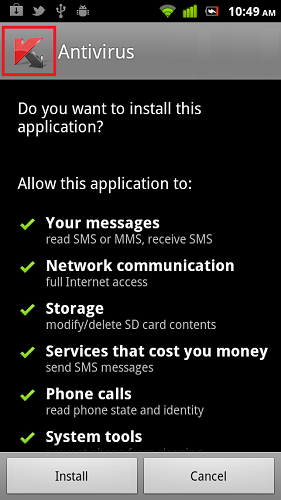
VirusScanner.apk is a rogue antivirus application which displays the Kaspersky logo when it is installed.
Identified as Trojan.Android.Generic.a by GFI’s VIPRE Mobile Security, the piece of malware reveals its true purpose during the installation process when it asks permission to access phone calls, messages and even services that cost money.
We strongly advise you to refrain from clicking on links contained in Twitter posts if they look suspicious. Furthermore, site addresses that end in .tk are usually a good indicator of a malicious plot.
On the other hand, even if you do end up on a shady site, at least make sure you don’t install anything that’s pushed to your device.
Finally, although many argue that mobile threats are not yet so popular, users should learn to treat their smartphones just as they do their computers and install antivirus solutions from legitimate and reputable companies.