
Softpedia
 

NEWS CATEGORIES:


NEWS ARCHIVE >>
SOFTPEDIA REVIEWS >>
MEET THE EDITORS >>
Home > News > Editor Blogs > Software

December 27th, 2011, 10:59 GMT · By

BLOG

Facebook Messenger for Windows Released

SHARE:

Adjust text size:

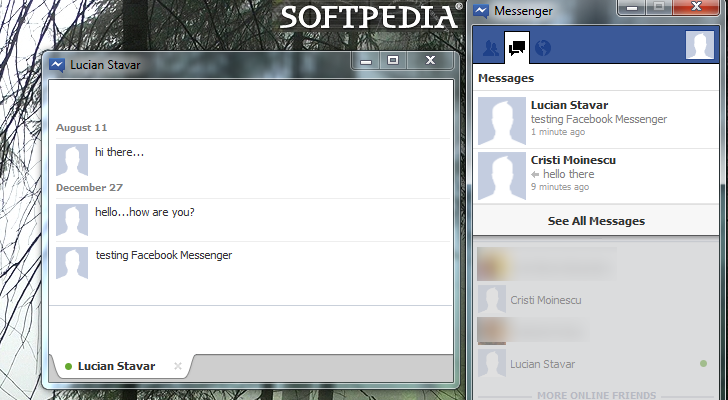
Chat and message with your friends on Facebook without using the browser Enlarge picture - Chat and message with your friends on Facebook without using the browser
We were in the know about Facebook working on its own chat client, but no download link was available at that time. Things have changed and now you can download Facebook chat client.

Some of the main features of the application are quite obvious, such as exchanging messages with your Facebook friends. However, there is more to it than this, as Facebook Messenger can be used to get the latest updates from your friends in ticker or receive notifications about what is going on.

You can dock it to the right part of the screen, in order to have it available at all times. However, the particularity of Facebook Messenger is that it cannot be hidden by maximized windows. Instead, it’ll resize all maximized windows so that it is visible most of the time (it does not override full-screen videos.)

Download Facebook messenger from this page

TELL US WHAT YOU THINK:

1,920 hits · 1 comment · Link to this article · Print article · Send to friend · Subscribe to news

MUST-READ RELATED ARTICLES:


Download Mozilla Thunderbird 10 Beta

Firefox 10 Beta Available for Download

Adobe Flash Player 11.2 Beta 3 Available for Download

Mozilla Thunderbird 9 and 3.1.17 Released

CCleaner 3.14 Improves Google Chrome Canary Support

READER COMMENTS:


Comment #1 by: kohryu87 on 28 Dec 2011, 07:13 UTC reply to this comment

Hmm, it's like what I thought, it still needs to open the browser to sign in, so very inconvenient, unlike yahoo messenger or windows live messenger. Uninstalling was a pain, as the installer still left a lot of entries in registry, also a lot of executable and dll files was left in the user app data/local directory. Also, it still have the startup entries, as well as scheduled tasks, very disappointed... :(

Copyright © 2001-2012 Softpedia. Contact/Tip us at

WindowsGamesDriversMacLinuxScriptsMobileHandheldNews

SUBMIT PROGRAM   |   ADVERTISE   |   GET HELP   |   SEND US FEEDBACK   |   RSS FEEDS   |   UPDATE YOUR SOFTWARE   |   ROMANIAN FORUM