
Search Perform an advanced search query SOFTPEDIA
 
SOFTPEDIA
Updated one minute ago
HomeSubmit a program for being reviewedAdvertise on our websiteGet help on surfing our websitesSend us your feedbackGet information about our XML/RSS backend and how to use itBrowse the news archiveVisit our discussion forumVizitati forumul in limba romana


KLIP
  1. HOME
  2. SCIENCE
  3. TECHNOLOGY
  4. WEBMASTER
  5. SECURITY
  6. MICROSOFT
  7. LINUX
  8. APPLE
  9. GAMES
  10. TELECOMS
  11. REVIEWS
  12. LIFE & STYLE
  13. EDITORIALS
  14. INTERVIEWS
  15. RSS
Welcome!
Hello, Guest

Login if you have a Softpedia.com account.

Otherwise, register for one.

SOFTWARE

Evernote 1.1 Supports PDF Files and Spotlight Integration

- Evernote allows you to capture information and later on reveal it in its original form

By: Filip Truta, Apple News Editor

Information manager expert Evernote Corporation has recently updated its "universal human memory extension" to version 1.1. While still in beta, the application adds a number of new features as well as tweaks, based
on user feedback, such as PDF support Encryption, Spotlight integration, Mixed View Mode and a Vertical Preview Pane, to name some of the most important additions.

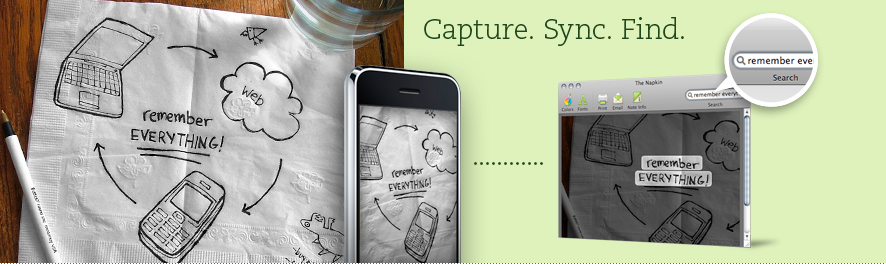
Using Evernote, you don't have to try and remember everything all the time. In fact, you can't! That's why Evernote even exists. Want to know what's even better? This here app isn't just a useful reminder tool stuck to your computer. There's also the web client and the iPhone version of the application. Why don't you check out Evernote's website right now to see what it's all about.

On the other hand, if you prefer us to do the talking, you should also know that Evernote does text recognition too. Also, everything you've added to Evernote's database as vital information to you is also accessible via image search. There's more. This one will blow you away: say you type in the search field the word "apple". If you have an image that contains (no, not an apple) the word apple written on it somewhere, the app will highlight that image immediately. OK, let's go a little slower.

Basically, Evernote allows you to easily capture information in any environment using whatever device or platform you find most convenient. The app then makes this information accessible and searchable at anytime, from anywhere, using the above mentioned criteria (keywords and images). That's it!

So, next time you bump into something of great interest to you, but can't look into it at that particular time, just add it to Evernote's database, whether you're at home, at work, on the go (on your mobile), or wherever there's a computer with an Internet connection available.

According to Evernote Corporation, things to capture include Webpages, Wine labels, Whiteboards, Scribbles, To-dos and Photos. Evernote 1.1 is free to download. Check with this page to get an invitation. Just type in your e-mail address and you'll be sent one shortly.

MORE RELATED ARTICLES: Today 1.1 Adds Filtering, 'Location' Field Back Up Your iPhone Text Messages Game Agent Online Store to Open in Summer 2008 Softpedia Recommended Mac Apps of the Week – 10.05.2008 Bezipped 1.0, Free Compression and Archive Utility for Mac OS X Apimac Launches Mac Notepad ‘08 for Mac OS X UTC Global Clock 3.0 Adds Timers, Stopwatches, Hourly Chimes iMedia Browser 1.1 Available. Download Here.
 
Comments | Link here | Subscribe
Print | Send to friend
Today's News | Yesterday's News

Search:


15th May 2008, 20:36 GMT | Copyright (c) 2008 Softpedia | Contact:
Read by 550 user(s) | Rating: | 6 vote(s) so far | Cast your vote:
Evernote 1.1 Supports PDF Files and Spotlight Integration - USER OPINIONS


We are sorry, there are no opinions available for this article.


SHARE YOUR OPINION ABOUT Evernote 1.1 Supports PDF Files and Spotlight Integration

Since you are not logged on, your comments will have to be approved before being displayed.
Click here to login, or register.
Your Name:
Your Email:
Type in the result:
Your Opinion:


DO YOU WANT TO CONTACT US?  

If you have some comments or you want to send us some information you can send us an email directly to .
You can use the form below for the same purpose.
Your full name: (at least 3 characters)
Your email address: (at least 5 characters)
Message subject: (at least 5 characters)
Message text:
(at least 10 characters)
Type in the result:


© 2001 - 2008 Softpedia. All rights reserved.
Softpedia™ and Softpedia™ logo are registered trademarks of SoftNews NET SRL.
Copyright Information | Privacy Policy | Terms of Use | Contact Softpedia | Update your software | Archive