
NEWS CATEGORIES:


NEWS ARCHIVE >>
SOFTPEDIA REVIEWS >>
Home / News / Linux / Linux Distributions

Linux Distributions


Endian Firewall 2.1.2 Released

Open Source firewall distribution

By Marius Nestor, Linux Editor

12th of July 2007, 08:43 GMT

Adjust text size:


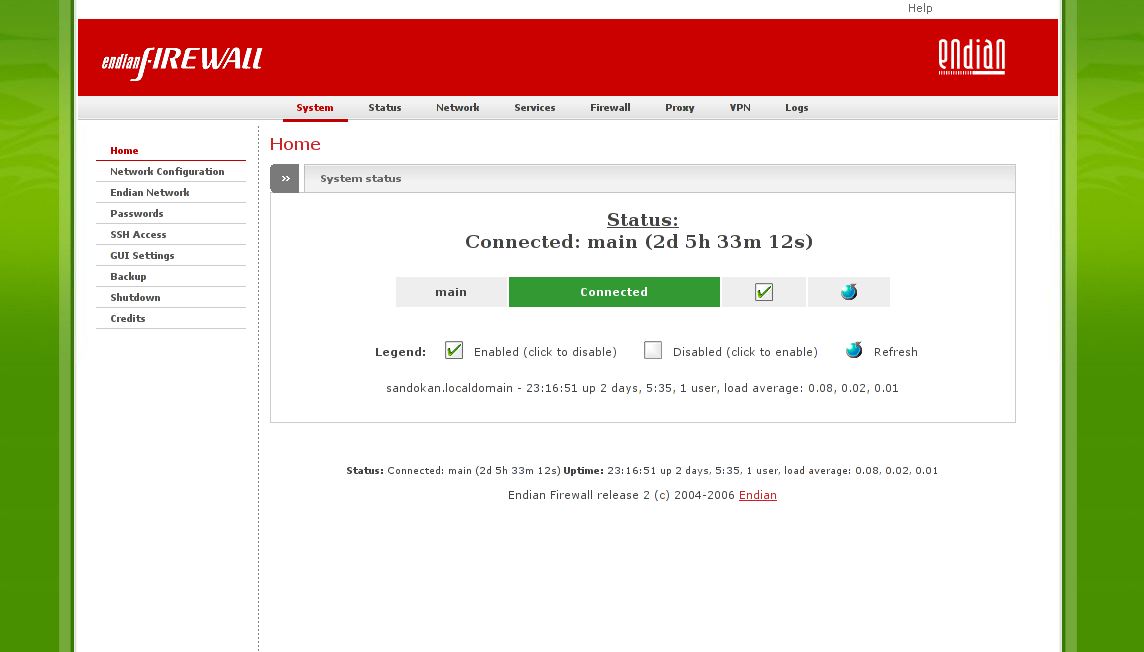
Endian Firewall
Enlarge picture
The Endian Team introduced yesterday a new version (2.1.2) of their Open Source Endian Firewall Community Edition which brings SATA support and a new wizard that appears after the installation, so you can setup root (system administrator) password. In addition, this new version offers the possibility of restoring a backup directly after installation and blocking incoming connections that come through the VPN (Virtual Private Network).

The Endian Firewall 2.1.2 includes a 1:1 NAT (for ALL port-forwarding protocol types) and provides added support for EFW as a XEN domU instance. The following components have been upgraded:

■ Linux Kernel
■ glibc - GNU C Library
■ clamav - Clam Antivirus
■ havp - HTTP Anti Virus Proxy

Moreover, the proxy authentication can now be bypassed for specific IP/MAC addresses.

For more information on this release of Endian Firewall Community check out the official release announcement.

If you have no idea how to install Endian Firewall, here are some installation hints:

Download the ISO image from Endian Firewall's Softpedia download page, burn it on a blank CD and boot from it. When the welcome screen appears, hit enter to boot. But don't forget to read the warning message!
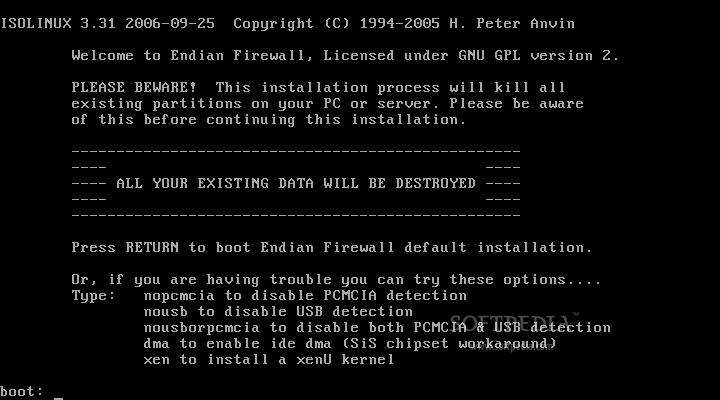
Review image


The installation wizard appears and you must choose a language for the Endian Firewall:
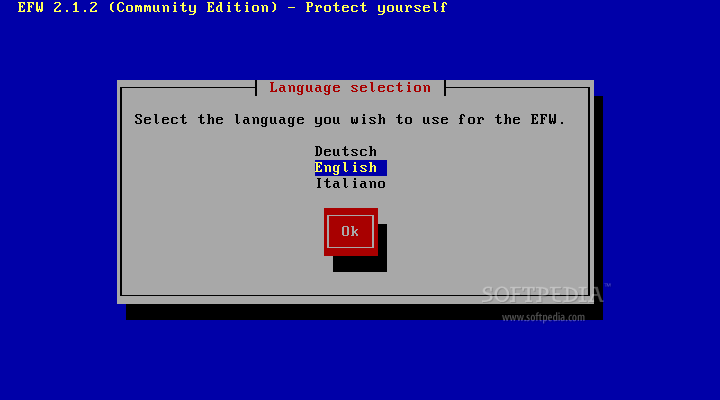
Review image


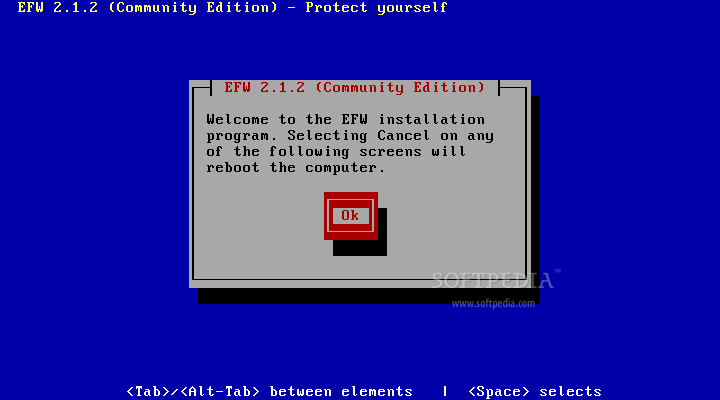
Hit OK on the welcome screen:

Review image


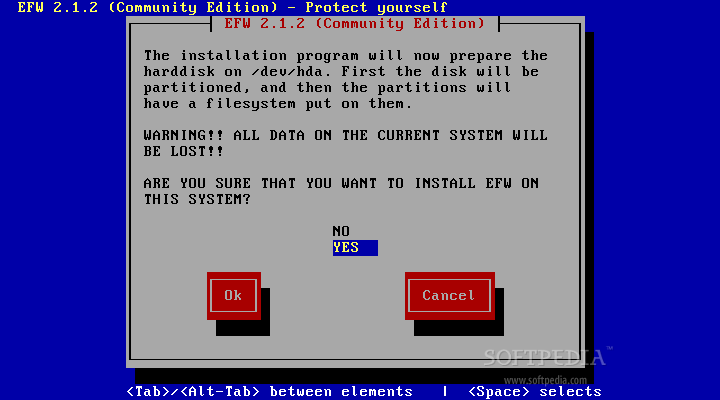
Are you sure that you want to install Endian Firewall on your computer? Select 'Yes' and hit OK to start the automated partitioning and the package installation processes:
Review image


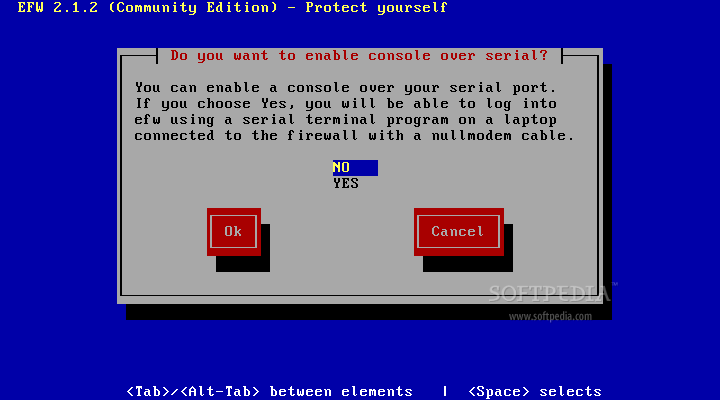
But before the partitioning and package installation starts, you will be asked if you want to enable a console over your serial port. This is useful if you want to log into Endian Firewall using a laptop connected to the firewall with a nullmodem cable:
Review image


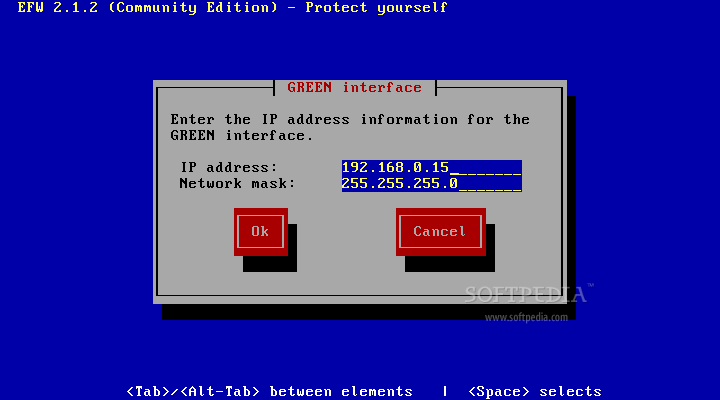
Wait about 1-2 minutes for the automated partitioning and the package installation processes to finish, and then you must enter the IP address and netmask for the GREEN interface:
Review image


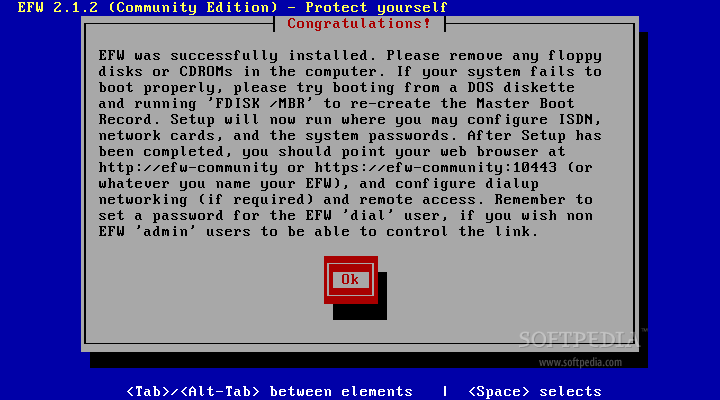
Congratulations! Endian Firewall was installed successfully. Please read carefully the endnotes:
Review image


What is Endian Firewall?

Endian Firewall Community is a "turn-key" GNU/Linux distribution that turns every system into a full-featured security appliance. Endian Firewall is very easy to install, flexible, easy to manage and use.

Its features include:

■ A stateful packet inspection firewall
■ Application-level proxies for various protocols (HTTP, FTP, POP3, SMTP) with antivirus support
■ Virus and spam filtering for email traffic (POP and SMTP)
■ Content filtering of Web traffic and a "hassle free" VPN solution (based on OpenVPN)

Endian Firewall's main advantage is that it is a pure "Open Source" solution that is sponsored by Endian.

Endian Firewall Community's goal is to work with the Open Source community to build a secure, complete and stable firewall exclusively from Open Source software: public forum, rapid progress, open process, open minds, open to new ideas. A proving ground for the new technology that may eventually make its way into Endian Firewall Appliance.

TAGS:

Endian | Firewall | Secure | Linux


Rating:
Good (3.3/5) 6 vote(s) so far    

Read by 5,482 user(s) | Add comment | Link to this article
Subscribe to news | Print article | Send to friend

© Copyright 2001-2008 Softpedia
Contact:


SEARCH THE NEWS ARCHIVE :


Today's News
| Yesterday's News | News Archive


MORE RELATED ARTICLES:


French Parliament Will Switch from Microsoft to Ubuntu

IBM, Oracle, NEC to Promote Linux in Japan

Scientific Linux 5.0 Release

Linux Claims Its Rights in China

QuickBooks Enterprise Solutions for Linux Servers

Printer Driver Available for All Linux Distributions

LinuxCertified Announces the Linux Device Driver Development Course

User opinions:


Comment #1 by: Muddlin Thru on 28 Sep 2007, 22:24 GMT reply to this comment

Thanks for the fine article! You would have been more helpful if you had, in fact, rebooted your machine, since then you would have seen the installeation come up with an automatic login and a text console. This console give us 3 choices:
0) Shell
1) Restore Factory Defaults
2) Reboot

Choosing 0 led, in my case, to a login request. Since there were no accounts created during the installation, and no passwords set up so far, there seems to be no way to proceed futher.

The end note wasn't really helpful in this regard. Attempting to connect to the green interface with http just times out.

Have you (or any of your readers) some ideas about how to proceed with the setup, or should I just take apart the initrd and fix the credentials problem?

Thanks!
Mudd


Comment #2 by: Andrei on 10 Jan 2008, 10:15 GMT reply to this comment

I have the same problem and no answers for it


Comment #3 by: Edhead on 15 Feb 2008, 05:05 GMT reply to this comment

You IP needs to be in the same subnet as the router (ie 192.168.x.x) use a browser to access the router and you set the password there. The reboot message said it the address would be http://efw-community or https://efw-community:1043, but it was efw-########. Try the Green IP (defaults to https://192.168.0.15:1043)


Comment #4 by: knivla on 17 Mar 2008, 06:15 GMT reply to this comment

i have also the same problem.... but in older version works ok


Comment #5 by: files engines on 18 Mar 2008, 11:22 GMT reply to this comment

Ty this:

http://www.mail-archive.com/efw-user@lists.sourceforge.net/msg00164.html

Good Luck!


Comment #6 by: Marcos on 05 May 2008, 14:30 GMT reply to this comment

Username: root
Password: endian

Share your opinion:

You are not logged on. Please provide your name and email address.
Log on to get your comments posted and visible instantly.
Your Name:
Your Email Address:
(will not be used for commercial purposes)
Solve this to prove you're not a bot: =
Your review/opinion:


SUBMIT PROGRAM   |   ADVERTISE   |   GET HELP   |   SEND US FEEDBACK   |   RSS FEEDS   |   ENTER NEWS SITE   |   ENGLISH BOARD   |   ROMANIAN FORUM