 14 DAY TRIAL //
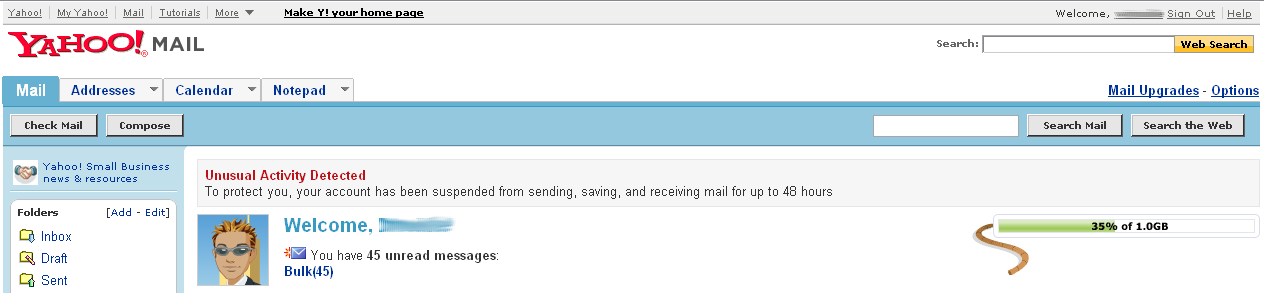
 Although I'm not a Yahoo Mail fan, every once in a while, I use the Sunnyvale company's product to communicate with my friends. Today, while I was trying to send a message through Yahoo Mail, the service returned me a weird error: "To protect you, your account has been suspended from sending, saving, and receiving mail for up to 48 hours." There is only one question: why?! In the recent period, I used Yahoo Mail to send a small number of messages, up to 5 per day. However, besides the error's title that says "Unusual Activity Detected", there is no additional information about the problem. I am really curios as to what the unusual activity was, since my Yahoo Mail activity was pretty inexistent.
Obviously, there is not much to do than wait for 48 hours until my Yahoo Mail account is enabled and I'm allowed to send, receive and save messages. Until then, let's analyze this message a bit and try to guess the cause. As a Yahoo Answers user sustains, the common reasons for this suspension are the viruses or address spoofing that makes the Sunnyvale company block your account. As I already said, my activity was quite inexistent so I'm not sure if this is the reason.
Maybe the spam messages that invaded my account were blocking it and caused the suspension. As you know, Yahoo Mail has pretty weak filters that are not able to block all the unsolicited messages sent to our inboxes. However, I am the lucky owner of Yahoo Mail with Yahoo Messenger and obviously with unlimited storage size, so I believe the attachments of the spam messages are not the problem.
In the past, several users encountered the same problem, their account being suspended after some other persons tried to guess their password. As a protection system, Yahoo blocks the account after the owner of that particular account types a wrong password for a certain number of times.