 14 DAY TRIAL //
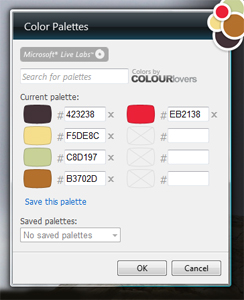
 The Colour Picker Gadget is a mini-application available as a free download from Microsoft. Designed by Jeff Weir, a UX Designer in Microsoft's Live Labs, the Colour Picker Gadget is set up to integrate seamlessly into Windows Vista, namely the Windows Sidebar. The Sidebar gadget is a tool aimed at content designers, permitting easy access, storage, exploration of colors and pallets. The Colour Picker Gadget not only permits users to essentially put together a collection of pallets, but also provides the hex code for each item.
“Many different programs use RGB color hex codes. While some programs have color management, sometimes you’ll need to use a palette across many programs like Expression Blend, Photoshop, Illustrator, HTML/CSS, and Flash. This handy sidebar gadget keeps your palettes at your fingertips, letting you quickly sample each hex code to your clipboard, so you can easily use your colors across all applications,” revealed a member of the Microsoft Live Labs team.
Via the Colour Picker Gadget, designers have the ability to centralize pallets in a single location. In scenarios in which the design work implies making use of a variety of programs, the gadget will not only contain all the colors needed for projects, but will also deliver easy access to the additional online resources, or in this case, sources of pallets. And in the end, if the functionality of the Colour Picker Gadget has not won you over, apparently it also makes a great decoration for the Windows Vista desktop.
“A side project from Live Labs designer Jeff Weir, the gadget also lets you search for palettes available from COLOURlovers, a fantastic resource for interesting and inspiring colors. Some people here in the lab don’t even use it for color management – they use it simply as a decoration that looks good next to their desktop,” the Microsoft Live Labs team member added.
The Colour Picker Gadget is available for download here.