 14 DAY TRIAL //
 While Windows 7 technologies are, as a general rule, available exclusively with the latest iteration of the Windows client from Microsoft, there also are exceptions. Illustrative examples are DirectX 11, which will be backported to Windows Vista, a smaller part of the Platform Update for Windows Vista, which features additional bits and pieces of Windows 7 beyond DX. Following the general availability of Windows 7, Microsoft also delivered Remote Desktop Connection 7.0 for previous releases of Windows.
The Redmond company announced as early as August 2009 that it would start offering new RDC 7.0 clients in the last quarter of 2009, and it managed to live up to its promise. RDC 7.0 is currently up for grabs via the Microsoft Download Center for customers running Windows Vista with Service Pack 1 (SP1) or SP2, and Windows XP SP3.
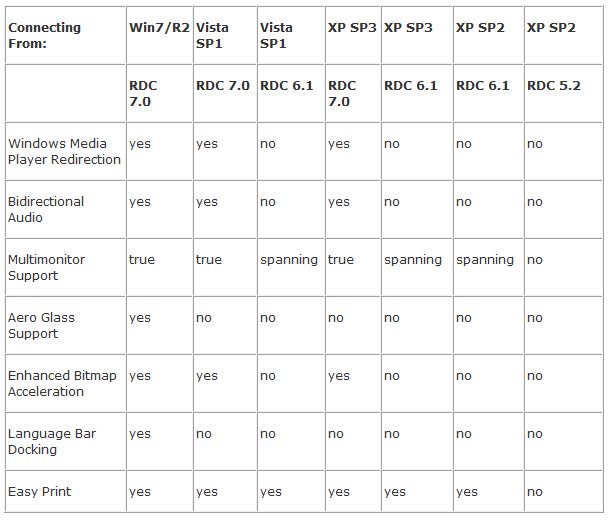
“RDC 7 will ensure that when connecting to Windows 7 and Windows Server 2008 R2 from an XP or Vista machines you are able to take advantage of the rich, advanced RDP7 features such as Media Player Redirection, True Multi-monitor support, etc.” Alex Balcanquall, from the Remote Desktop Services (Terminal Services) team revealed. “If you use RDC 7.0 to connect to XP or Vista you do not get new Windows 7 features like Windows Media Player Redirection etc. There is no way to get these features when connecting to XP or Vista.”
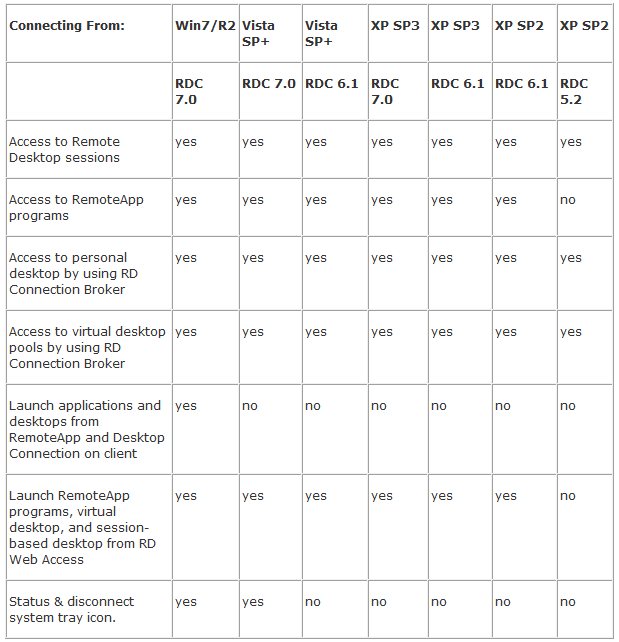
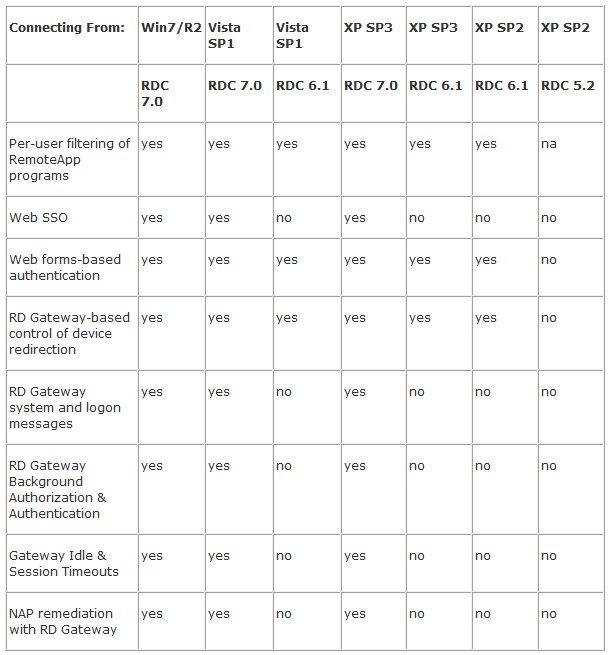
In the images included below, customers will be able to see what Remote Desktop Connection 7.0 has to offer in combination with various Windows releases. The details are offered by the Remote Desktop Services (Terminal Services) team.
“The Remote Desktop Connection 7.0 client update enables you to use the new Remote Desktop Services features. These features are introduced in Windows 7 and in Windows Server 2008 R2 and are available for computers that are running Windows Vista Service Pack 1 or Windows Vista Service Pack 2. After you install this item, you may have to restart your computer,” Microsoft noted.
- Update for Windows XP (KB969084) - Update for Windows Vista (KB969084) - Update for Windows Vista for x64-based Systems (KB969084)