
Softpedia
 

NEWS CATEGORIES:


NEWS ARCHIVE >>
SOFTPEDIA REVIEWS >>
MEET THE EDITORS >>
Home > News > Apple > Software

May 18th, 2009, 11:02 GMT · By

Download Twin 1.0 (Final) Backup Solution for Mac

SHARE:

Adjust text size:


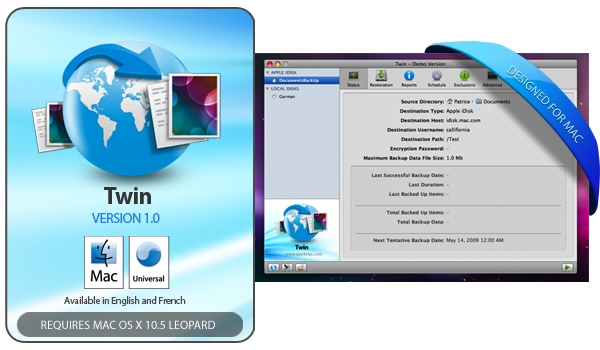
Twin promo material
Enlarge picture
Developer app4mac, which focuses exclusively on crafting innovative and intuitive applications for Mac OS X, has released a brand new piece of software. Also specifically designed for the Mac, Twin is touted by its maker as being “the most flexible online backup solution for Mac OS X, compatible with most Internet servers.” Twin can back up your valuable files to FTP, FTPS, SFTP, WebDAV, Amazon S3, as well as MobileMe, and supports offline backups to external drives.

“Twin is a true Mac product that preserves Finder info, resource forks, ACLs, Privileges and comes with an elegant user interface and a powerful assistant,” app4mac states. “It also provides numerous high-end features like AES-256 encryption, efficient bz2 compression, powerful exclusion rules and scheduler, support for splitting large files during network transfers, network-error recovery, individual digital signature for backed up files, multi-cores machines optimization and much more!”

Speaking of that file-splitting, files from the directory being backed up that are smaller than the maximum 128 MB size will be grouped together. Files bigger than this maximum size will be split. This allows backup and restoration operations to be more efficient, according to app4mac.

“Twin is the best backup solution for Mac OS X users who already have access to online storage (web hosting, work servers, MobileMe...), or who want to buy their own dedicated online storage (Amazon S3, Bingo Disk, Online Storage Solutions), or even users who simply want more control and advanced features than other backup products allow,” app4mac adds.

Unfortunately for those still using Tiger, Twin is optimized for Mac OS X 10.5 Leopard. However, PowerPC users are in luck, as it is also optimized for PowerPC G4, G5 and Intel processors (Universal Binary).

Those looking to give Twin a try can do so by downloading the trial version of the software. Good for 15 days, the unregistered version limits your backups to a single 250 Mb archive, while restoring will be done one file at a time. To remove those limitations, as well as to get unlimited free updates and tech support, you must buy the $39.19 license for the full version of Twin. The program is currently localized in English and French.

Download Twin (Update / Trial / Buy)

TELL US WHAT YOU THINK:

2,643 hits · 2 comments · Link to this article · Print article · Send to friend · Subscribe to news

MUST-READ RELATED ARTICLES:


TrailRunner 2.0 Is Out – Download Here

Adium 1.3.4 Patches Facebook Bugs – Download Here

Download X11 for Mac OS X 10.5.7 – Free

Apple Hiring 'At-Home' Tech Support Personnel

Site Posts Info on Future iPhone and iPod

READER COMMENTS:


Comment #1 by: Mark Brown on 24 May 2009, 21:26 UTC reply to this comment

My experience with Twin was a massive failure. Twin used to be called Persistence, before the product was bought up by app4mac.

When I started experiencing core dumps with Persistence, and then with Twin, here is the response from Twin support:
"it's clear that your issues are related to your previous Persistence settings.
Other customers doesn't have issues.

My advice will be to completely restart your backup and no longer use the settings
or data used with Persistence. It will be too complicated and time consuming
for us to solve your issue.


app4mac Support Engineer"

Good thing I hadn't actually been in a data loss situation!

Your customers back up their data precisely because it is *important* to them. A problem with their backup program - one the keeps them from accessing their backups - is therefore an *important* problem.

App4Mac's response above tells me that they do not *care* about the importance of the customers' data, if things get "too time consuming" for them they will drop you in the ditch.

The message they have sent me with that reply is: "App4Mac Twin cannot be trusted with your data - find another backup software to use."


Comment #2 by: Steve on 03 Jan 2010, 19:34 UTC reply to this comment

I have the latest (Jan 2010) version of Twin v.1.2.1 and it seems to have come a long way in the last few months (judging by some of the previous reviews). The interface is straightforward yet displays the command line process in the Report tab so its clear what's going on "under the hood"

The AES-256 Encryption and file splitting options deliver what I was looking for (to securely back up to my free 50gb backups user on Dreamhost) and copes with my inconsistent Network connection by automatically suspending upload and retrying (without starting from scratch).

It deals with large uploads (thanks to the file splitting) and its quite flexible in terms of Restoration (eg. can extract single files very quickly if you only need to repair 1 file in a folder). Some of the interface could do with some development love, but it seems that App4Mac have been very hands on addressing user feedback of late and its the only software I can find that offers such an intuitive interface (keeping a user overview of security and folders/exclusions etc.) so I think it does the job well but does has huge potential for development/expansion/polishing

Its not the cheapest but I'm very happy with my purchase and the practical solution it has offered me. I wanted to write a review since some of the older feedback has been quite negative for previous versions. Its also just got a Staff Pick by Apple so hopefully the older incarnations will not deter the new users (it almost put me off buying)

Copyright © 2001-2012 Softpedia. Contact/Tip us at

WindowsGamesDriversMacLinuxScriptsMobileHandheldNews

SUBMIT PROGRAM   |   ADVERTISE   |   GET HELP   |   SEND US FEEDBACK   |   RSS FEEDS   |   UPDATE YOUR SOFTWARE   |   ROMANIAN FORUM