 14 DAY TRIAL //
 Developer Norbert M. Doerner has come up with a way to allow Aperture and iPhoto users to quickly and effortlessly upload their photos to the popular Locr service directly from within Apple's two photography software applications. The plugin is free to download and use for both Aperture and iPhoto.
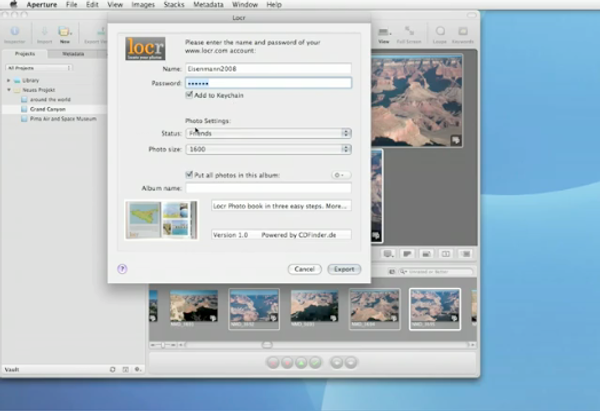
According to the developer, Locr for Aperture is a new plug-in that allows you to upload your photos to the popular Locr service directly from within Aperture. “This works for one or several selected photos as well as for entire albums,” Doerner explains. “Along with the photos, their geotags, their description, as well as any keywords are being sent. The uploaded photos can be stored into new, or existing albums,” the description ends. The plug-in requires Mac OS X 10.4 or 10.5, and Aperture 1 or 2.
On the iPhoto side, Locr also allows you to upload your photos to your favorite photo service directly from within iPhoto. The photos are uploaded with their geotags, description, and keywords, just like with Locr for Aperture. Additionally, for iPhoto users, the plug-in sends any Place information you may have set in iPhoto 8 to the server. According to the developer, the uploaded photos can be stored into new or existing albums. System requirements include Mac OS X 10.4 or 10.5, and iPhoto 7 or iPhoto 8.
To install either version of the plug-in, simply download the DMG file using the links provided just below, double click to open the disk image, and run the installer it contains by following the on-screen instructions. The plug-in will be installed into /Library, meaning that all users on that Mac will be able to use it. The moment you fire up Aperture / iPhoto again, you'll be able to start using the plug-in. Video tutorials (via YouTube) are available further down below to see how the plug-in is used.
While Locr for iPhoto has been around since last week, Locr for Aperture is a brand new plug-in developer by CDFinder chief developer Norbert M. Doerner. CDFinder for Macintosh is a compact and fast digital asset manager (disk cataloger, image database) for the Mac. Last updated on January 7, 2009, the software is available for free download under the form of a demo, right here on our web site.
Download Locr for Aperture (Free)
Download Locr for iPhoto (Free)
Locr for Aperture
Locr for iPhoto