 14 DAY TRIAL //
 Add-ons are always a great means for expanding the capabilities of applications, and they are specifically great when it comes to mobile browsers.
On the small screen of a mobile phone, it comes very handy to be able to perform various actions with a single clock or with only few of them, and here's where add-ons enter the game.
Of course, the features of any add-on depend on its purpose, and the new Bookmark Sync (Beta) for Dolphin Browser HD comes with specific capabilities, enabling users to easily sync their bookmarks across devices.
For the time being, the add-on is only a preview software, capable of syncing your bookmarks and compatible only with the latest version of the mobile browser, namely Dolphin HD v6.2 beta, but more features are being added to it to expand its usability.
“If you need to transfer hundreds of bookmarks between different devices, here comes the solution,” the development team behind the application notes in a blog post.
“Instead of transferring Data through USB cable or computer, Bookmark Sync enables you to sync bookmarks between devices just by logging in your Dolphin Account.”
Bookmark Sync (Beta) is work in progress at the moment, but it should be released as a final flavor in the near future.
The company announced that they were working on making it available for download at the same time with the final release of Dolphin HD v6.2.
Both of them should be released in the Android Market, the company announced, adding that the add-on is certain to include much more features soon.
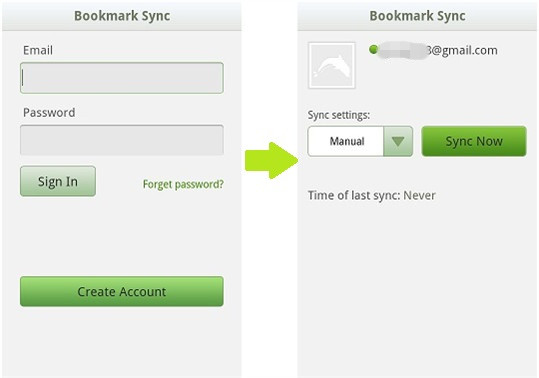
Users interested in trying out the new Bookmark Sync (Beta) will have to sign up for a Dolphin account first, and will have to get through the following process: 1. Open Bookmark sync, click “Create Account”. 2. Input your email address and a password for creating a Dolphin account. Please make sure that the email address you input is correct. 3. Go to your email inbox to activate your Dolphin account. You should activate your account within 30 days, or the link will expire and you cannot use this service. 4. Go back to Bookmark Sync (Beta) after inactivating your Dolphin account. 5. Choose “Manual” or auto-sync duration time, then click “Sync Now”.