 14 DAY TRIAL //
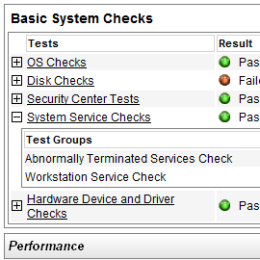
 The System Health Report is a diagnostic tool integrated into Windows Vista. Nick White, Microsoft Product Manager has this to say about the Vista's diagnosis capabilities: "One of my favorites, as with many others here internally at Microsoft, is the ability to create a System Health Report. This report will help you diagnose your system's health and provides possible solutions issues that may be affecting your PC's health."
The System Health Report centralizes information from the Performance and Reliability Monitor and sums up the input into a report highlighting the status of the system. The feature is accessible via Control Panel, System and Maintenance, Performance Information and Tools, Advanced tools and Generate a System Health Report.
"Each report gathers information for roughly 60 seconds, so it's easy to run several reports. To establish a baseline, run a report immediately after startup, with no programs running except those that start up automatically. You can run additional reports while you run particularly stressful programs to see whether the load is overtaxing your system," stated Ed Bott of ZDNet.