
Softpedia
 

NEWS CATEGORIES:


NEWS ARCHIVE >>
SOFTPEDIA REVIEWS >>
MEET THE EDITORS >>
TRENDING TODAY
Home > News > Microsoft > Software Blog

December 4th, 2012, 23:54 GMT · By

BLOG

Create Custom Start Screen Tiles in Windows 8

SHARE:

Adjust text size:


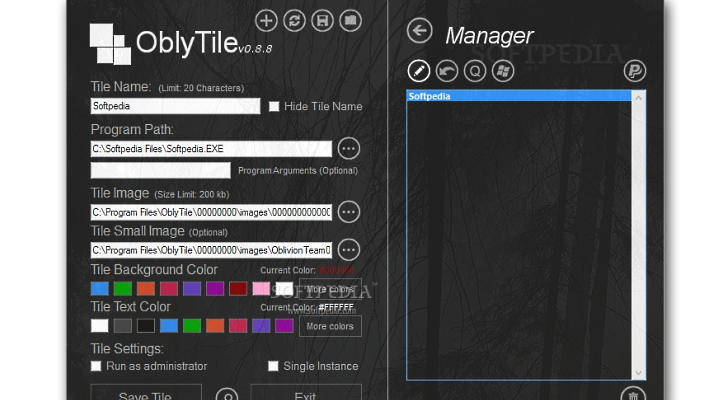
Option for adding arguments for programs is available Enlarge picture - Option for adding arguments for programs is available
Adding a new tile to the modern Start Screen in Windows 8 is a simple job, but the results are just as unimpressive. With OblyTile you can add a little pizzazz to this area of the OS by creating custom tiles for various programs, folders and even websites.

Personalization of these items goes beyond adding a specific color in the background and extends to applying a custom image and choosing the color for the text.

Furthermore, OblyTile mixes in the possibility to run programs as an administrator as well as run them with certain arguments. These options are also available in the Properties dialog of any application shortcut in Windows.

All the tiles are saved in the built-in manager and can be tweaked at any time. OblyTile also allows you to customize the Modern UI shortcuts for various Windows locations and tools such as Command Prompt, Disk Defragmenter, Paint, Notepad, Libraries or Control Panel.

Download OblyTile

TELL US WHAT YOU THINK:

9,946 hits · Link to this article · Print article · Send to friend · Subscribe to news

MUST-READ RELATED ARTICLES:


Zemana AntiLogger 1.9.3.251 Released

Google Chrome 24.0.1312.32 Beta Available for Download

Bitdefender Releases 60-Second Virus Scanner

XYplorer 11.80.0100 Released

Sleipnir 3.8.3 Available for Download

READER COMMENTS:


No user comments yet.
Be the first to express your opinion!
Copyright © 2001-2013 Softpedia. Contact/Tip us at

WindowsGamesDriversMacLinuxScriptsMobileHandheldNews

SUBMIT PROGRAM   |   ADVERTISE   |   GET HELP   |   SEND US FEEDBACK   |   RSS FEEDS   |   UPDATE YOUR SOFTWARE   |   ROMANIAN FORUM