
Softpedia
 

NEWS CATEGORIES:


NEWS ARCHIVE >>
SOFTPEDIA REVIEWS >>
MEET THE EDITORS >>
TRENDING TODAY
Home > News > Microsoft > Software Blog

December 8th, 2012, 03:21 GMT · By

BLOG

Classic Start 8 is a Simple Start Button Alternative for Windows 8

SHARE:

Adjust text size:


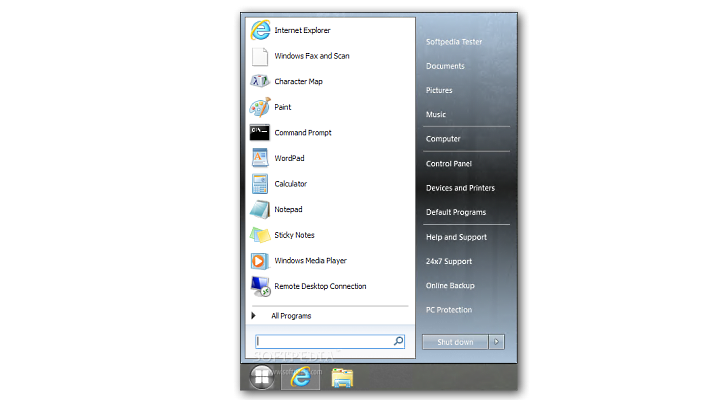
What you see is what you get, no settings available Enlarge picture - What you see is what you get, no settings available
The lack of the start button in Windows 8 created a lot of mixed feelings about the success of the new operating system from Microsoft. Luckily, there are several alternatives for this issue, and Classic Start 8 (freeware) is among the newest available.

Once installed, it adds the lost button and offers almost the same functionality as the launcher in Windows 7.

Looks are very similar to the original, as Classic Start 8 shows a list with accessed programs, a search bar and the side menu.

Not available in this alternative is the user picture and the list of recent items for the entries. You do not have to deal with any settings because there aren’t any.

The launcher can be deployed in the same easy way as the original counterpart in Windows 7.

Download Classic Start 8

TELL US WHAT YOU THINK:

6,324 hits · Link to this article · Print article · Send to friend · Subscribe to news

MUST-READ RELATED ARTICLES:


Google Chrome 24.0.1312.35 Beta Available for Download

Opera 12.12 Snapshot Released

Create Custom Start Screen Tiles in Windows 8

Zemana AntiLogger 1.9.3.251 Released

Bitdefender Releases 60-Second Virus Scanner

READER COMMENTS:


No user comments yet.
Be the first to express your opinion!
Copyright © 2001-2013 Softpedia. Contact/Tip us at

WindowsGamesDriversMacLinuxScriptsMobileHandheldNews

SUBMIT PROGRAM   |   ADVERTISE   |   GET HELP   |   SEND US FEEDBACK   |   RSS FEEDS   |   UPDATE YOUR SOFTWARE   |   ROMANIAN FORUM