
Softpedia
 

NEWS CATEGORIES:


NEWS ARCHIVE >>
SOFTPEDIA REVIEWS >>
MEET THE EDITORS >>
Home > News > Editor Blogs > Software

November 30th, 2011, 13:00 GMT · By

BLOG

Change Windows 7 Product Key

SHARE:

Adjust text size:

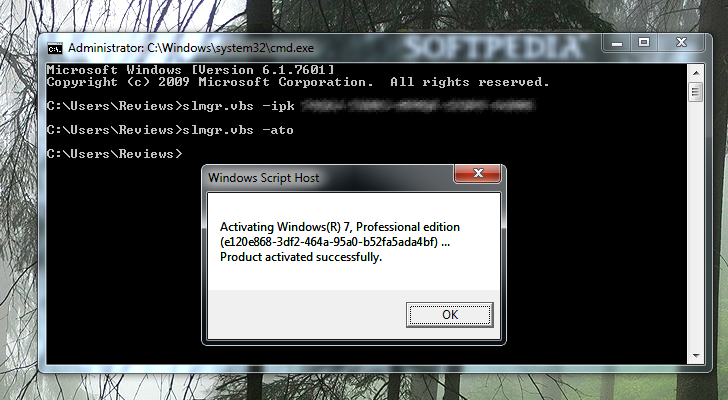
Use Command Prompt to change product key and activate it Enlarge picture - Use Command Prompt to change product key and activate it
There is an easy way to replace the current product key in Windows 7, regardless of the edition you’re running. If you check the “Properties” page of the computer, at the bottom you’ll notice the option to activate Windows with a new key.

This is the obvious method, embraced by most of the users; but you can achieve the same result in a more technical manner, used by more experienced users, by punching in commands in Command Prompt, which needs to be run with administrator privileges.

The steps are easy to follow as long as you remember the commands, which is not that difficult. Punch in “slmgr.vbs –ipk product key” command, where “product key” is the actual serial number.

To activate the new key, simply type “slmgr.vbs –ato” and your copy of Windows will be registered with the new product key.

TELL US WHAT YOU THINK:

3,367 hits · Link to this article · Print article · Send to friend · Subscribe to news

MUST-READ RELATED ARTICLES:


Explore Windows Restore Points

Ultimate Windows Customizer

Yahoo! Messenger 11.5.0.152 Adds Tabbed IMs

CCleaner 3.13 with Internet Explorer Add-on Manager

50% Off BitDefender Products

READER COMMENTS:


No user comments yet.
Be the first to express your opinion!
Copyright © 2001-2012 Softpedia. Contact/Tip us at

WindowsGamesDriversMacLinuxScriptsMobileHandheldNews

SUBMIT PROGRAM   |   ADVERTISE   |   GET HELP   |   SEND US FEEDBACK   |   RSS FEEDS   |   UPDATE YOUR SOFTWARE   |   ROMANIAN FORUM