
Softpedia
 

NEWS CATEGORIES:


NEWS ARCHIVE >>
SOFTPEDIA REVIEWS >>
MEET THE EDITORS >>
TRENDING TODAY
Home > News > Microsoft > Software Blog

October 22nd, 2012, 17:50 GMT · By

BLOG

Change Taskbar Color in Windows 8

SHARE:

Adjust text size:


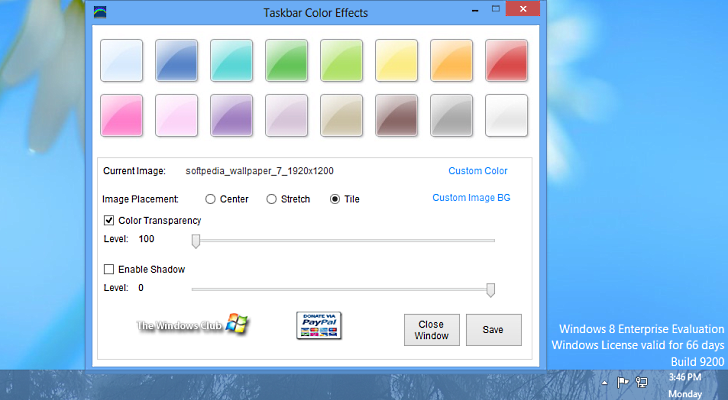
You can also customize the taskbar with an image of your own Enlarge picture - You can also customize the taskbar with an image of your own
There are plenty of third-party tools that can be used to customize various parts in Windows. However, few of them touch on the taskbar element of the desktop. Taskbar Color Effects is a nifty tool that can modify the way the taskbar looks.

It’s a simple application that can be viewed as an extension for the Personalization menu. Its purpose is simply to modify the color of the taskbar in Windows.

Taskbar Color Effects features the same range of colors available in Window Color and Appearance dialog, but it also provides a color palette to choose a custom one. Moreover, it can apply transparency effect as well as a background image.

Taskbar Color Effects does not require installation and is free of charge. It is available for download from this page.

TELL US WHAT YOU THINK:

8,705 hits · Link to this article · Print article · Send to friend · Subscribe to news

MUST-READ RELATED ARTICLES:


Windows 8 ModernUI Start Screen Changer

Simple Mac Exposé Mimic for Windows

Customize Windows 8 Start Screen

Tabs Added to Windows Explorer

Customize Windows 7 Logon Page

READER COMMENTS:


No user comments yet.
Be the first to express your opinion!
Copyright © 2001-2013 Softpedia. Contact/Tip us at

WindowsGamesDriversMacLinuxScriptsMobileHandheldNews

SUBMIT PROGRAM   |   ADVERTISE   |   GET HELP   |   SEND US FEEDBACK   |   RSS FEEDS   |   UPDATE YOUR SOFTWARE   |   ROMANIAN FORUM