 14 DAY TRIAL //
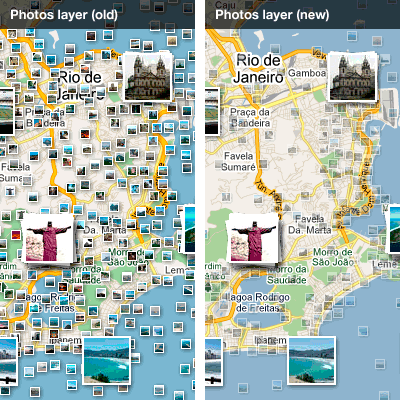
 The Photos layer in Google Maps just got a major improvement making it much easier to find great user photos of the locations you're interested in. There are several changes, meant to improve the legibility and the amount of information available to the user.
"Here at Google, we love the experience of browsing photos on a map, and today it just got a lot easier," Jonah Jones, User Experience Designer at Google Maps, said.
"We have launched an update to the design of the Photo layer in Google Maps to provide you with a better experience when browsing your favorite places," he announced.
One of the changes is rather subtle but should make a big difference. Photos are now better grouped together making it easy to find places with a lot of photos.
This enables you to determine where are the more popular locations in a city or region, perhaps helping you plan your vacation or an itinerary.
The Photos layer in Google Maps now features transparent icons for the smaller thumbnails. This way, the map below is still visible and it's easy to get your bearings.
This small but important change solves a problem with popular tourists' spots. These locations are regularly overrun with photos making it hard to see the map with the Photo layer enabled.
If you're browsing a location you're not familiar with, it makes a world of difference.
The final update to the Photo layer is similarly unassuming, but quite useful. Hovering over a thumbnail will bring up a small overlay with a thumbnail of the image and its title.
This is especially useful for small thumbnails as it enables you to preview the photo and many times find out where it's taken just by hovering the mouse over it. Clicking on the image brings up an even larger preview and more info.