
Search Perform an advanced search query SOFTPEDIA
 
SOFTPEDIA
Updated one minute ago
HomeSubmit a program for being reviewedAdvertise on our websiteGet help on surfing our websitesSend us your feedbackGet information about our XML/RSS backend and how to use itBrowse the news archiveVisit our discussion forumVizitati forumul in limba romana


KLIP
  1. HOME
  2. SCIENCE
  3. TECHNOLOGY
  4. WEBMASTER
  5. SECURITY
  6. MICROSOFT
  7. LINUX
  8. APPLE
  9. GAMES
  10. TELECOMS
  11. REVIEWS
  12. LIFE & STYLE
  13. EDITORIALS
  14. INTERVIEWS
  15. RSS
Welcome!
Hello, Guest

Login if you have a Softpedia.com account.

Otherwise, register for one.

TIPS AND TRICKS

Automatically Elaborate and Publish Flash Quizzes without Programming Knowledge

- Simplify test writing tasks with Quiz Builder

By: Catalin Bocanu, Web News Editor

Quizzes are usually used for educational purposes and they can be created through various methods, starting from classic test papers to modern electronic quizzes. In electronic form, quizzes can be built using any quiz generator, which will simplify your work.

When you need to create and publish quizzes on a website, you
have many alternatives to choose from. Quizzes can be built with server side programming languages or client side languages, such as Javascript or Flash.

These types of quizzes, that run on client side, are very easy to construct, even without programming knowledge. One solution would be the customization of ready-made quizzes, but in this case, you may have limited options to implement certain features representing particular aspects of your own quizzes.

Flash quizzes are the most intuitive and provide the highest compatibility with all modern Flash-enabled web browsers. Quiz Builder is a Windows application that acts as a quiz generator. It allows you to export quizzes as stand-alone files (compatible with Windows, Linux and MacOS operating systems), Flash .swf files or as Microsoft Word documents.

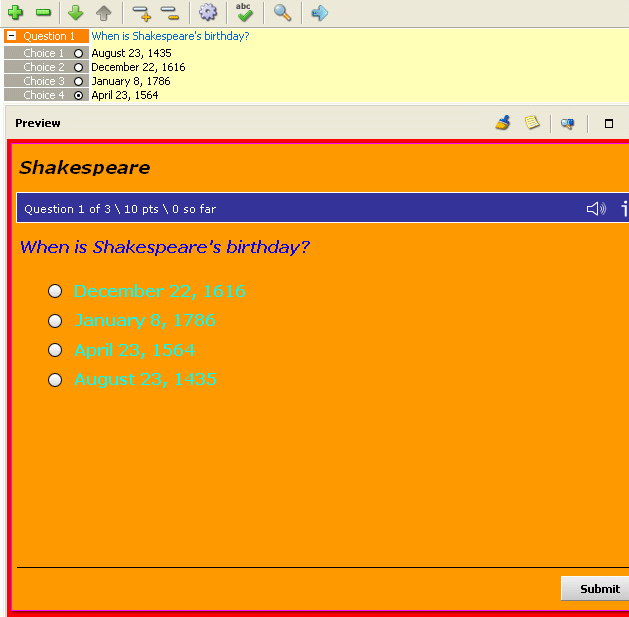
You can make any type of quiz with multiple choice and various answering types, such single answer, multiple answers, fill in the blanks and more. Any quiz feature can be controlled from a very simple to use GUI (graphical user interface). You can setup the layout, number and type of questions and answers, quiz password, export options and more. You are allowed to add images, sounds, comments to every quiz.

After you finalize your quiz’s construction, you must select the export as .swf option from the main File menu. The quiz could be automatically uploaded on the server you specify or saved on the local hard drive. You will identify then the .swf file and the accompanying HTML file. You can use it as default, by providing your users a link to the HTML file or insert the .swf file in other page of your website. This Flash quiz generator tool will help you to rapidly create professional quizzes and also validate them in order to be sure of the relevance of the results.

MORE RELATED ARTICLES: Professional Navigation Menus with Flash Quickly Customize and Publish Flash Websites with TRENDYFLASH SITE BUILDER Google Tests Flash-Based Search Engine Free Visual Tool for PHP.ini Configuration on Windows Easy Deployment of PHP Applications on Windows Automatically Generate PHP / MySQL Websites Management of A Free Custom Search Engine A Free Multilingual Real Estate Website Easy Customization of Joomla Templates
 
Comments | Link here | Subscribe
Print | Send to friend
Today's News | Yesterday's News

Search:


21st November 2007, 17:04 GMT | Copyright (c) 2007 Softpedia | Contact:
Read by 656 user(s) | Rating: | 7 vote(s) so far | Cast your vote:
Automatically Elaborate and Publish Flash Quizzes without Programming Knowledge - USER OPINIONS


We are sorry, there are no opinions available for this article.


SHARE YOUR OPINION ABOUT Automatically Elaborate and Publish Flash Quizzes without Programming Knowledge

Since you are not logged on, your comments will have to be approved before being displayed.
Click here to login, or register.
Your Name:
Your Email:
Type in the result:
Your Opinion:


DO YOU WANT TO CONTACT US?  

If you have some comments or you want to send us some information you can send us an email directly to .
You can use the form below for the same purpose.
Your full name: (at least 3 characters)
Your email address: (at least 5 characters)
Message subject: (at least 5 characters)
Message text:
(at least 10 characters)
Type in the result:


© 2001 - 2008 Softpedia. All rights reserved.
Softpedia™ and Softpedia™ logo are registered trademarks of SoftNews NET SRL.
Copyright Information | Privacy Policy | Terms of Use | Contact Softpedia | Update your software | Archive