
Search Perform an advanced search query SOFTPEDIA
 
SOFTPEDIA
Updated one minute ago
HomeSubmit a program for being reviewedAdvertise on our websiteGet help on surfing our websitesSend us your feedbackGet information about our XML/RSS backend and how to use itBrowse the news archiveVisit our discussion forumVizitati forumul in limba romana


KLIP
  1. HOME
  2. SCIENCE
  3. TECHNOLOGY
  4. WEBMASTER
  5. SECURITY
  6. MICROSOFT
  7. LINUX
  8. APPLE
  9. GAMES
  10. TELECOMS
  11. REVIEWS
  12. LIFE & STYLE
  13. EDITORIALS
  14. INTERVIEWS
  15. RSS
Welcome!
Hello, Guest

Login if you have a Softpedia.com account.

Otherwise, register for one.

TIPS AND TRICKS

Automatically Create HTML Photo Albums with Image Thumbnailer and Converter Software

- Publish your digital images without programming knowledge

By: Catalin Bocanu, Web News Editor

When you want to publish your images on the Internet, you have various options. There are many types of image management softwares available on all platforms that will allow you to create an image gallery or a photo album in order to be used on the web or on your personal computer. But many of these software tools will require certain skills or knowledge concerning digital image manipulation.

You can
publish on Internet simple image galleries that are made only with HTML using Image Thumbnailer and Converter software. It is a lightweight Windows application (distribution file size is only 592 KB) which allows you to create HTML image galleries with a few mouse clicks.

This image management tool will permit you to convert all images contained in a single folder at a time in other format, for example from .bmp to .jpg. You can also adjust the compression settings for jpg files or to resize images. All images can be renamed in batch or transformed into thumbnails.

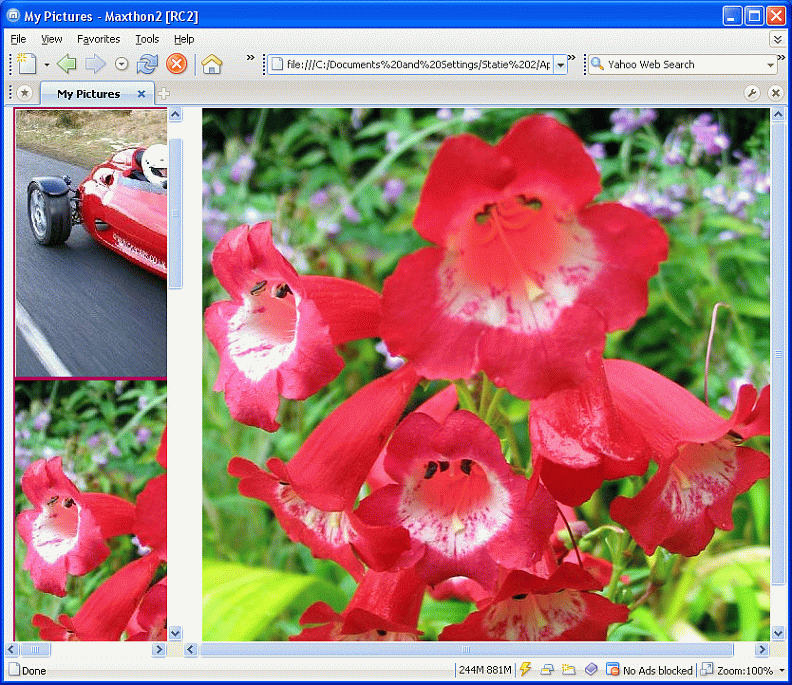
The software permits the generation of three types of HTML image galleries having as navigation menu links index or thumbnails index. The third type of HTML image gallery uses CSS to introduce some images navigation effects. It uses image opacity attribute by setting it as default 50% and the opacity will be reset to 100% on mouse hover, as is specified in CSS code.

The main advantages of this software for creating image galleries are: image batch editing, jpeg compression adjustable settings, editable HTML code (HTML code is not encrypted), rapid creation of images galleries without HTML knowledge and more.

One major disadvantage is the impossibility to create image galleries from png images or to convert other images to png format. This type of image file (png) has many advantages over jpeg regarding image file size, browser rendering speed and more. For educational purposes, this software could be used by beginners in HTML to correlate the HTML code structure for simple image galleries with the image display mechanism in web pages.

MORE RELATED ARTICLES: Advantages of Images in Portable Network Graphics (PNG) Format How to Create and Publish Simple Websites with Adobe Dreamweaver CS3 Optimal Usage of WYSIWYG HTML Editors: KompoZer Case Google Page Creator Web Colors Organize Your Website Directory Structure Efficiently Professional Navigation Menus with Flash An Efficient Way to Edit, Share and Publish Presentations Online
 
Comments | Link here | Subscribe
Print | Send to friend
Today's News | Yesterday's News

Search:


7th November 2007, 16:13 GMT | Copyright (c) 2007 Softpedia | Contact:
Read by 1,248 user(s) | Rating: | 7 vote(s) so far | Cast your vote:
Automatically Create HTML Photo Albums with Image Thumbnailer and Converter Software - USER OPINIONS


We are sorry, there are no opinions available for this article.


SHARE YOUR OPINION ABOUT Automatically Create HTML Photo Albums with Image Thumbnailer and Converter Software

Since you are not logged on, your comments will have to be approved before being displayed.
Click here to login, or register.
Your Name:
Your Email:
Type in the result:
Your Opinion:


DO YOU WANT TO CONTACT US?  

If you have some comments or you want to send us some information you can send us an email directly to .
You can use the form below for the same purpose.
Your full name: (at least 3 characters)
Your email address: (at least 5 characters)
Message subject: (at least 5 characters)
Message text:
(at least 10 characters)
Type in the result:


© 2001 - 2008 Softpedia. All rights reserved.
Softpedia™ and Softpedia™ logo are registered trademarks of SoftNews NET SRL.
Copyright Information | Privacy Policy | Terms of Use | Contact Softpedia | Update your software | Archive