
Softpedia
 

NEWS CATEGORIES:


NEWS ARCHIVE >>
SOFTPEDIA REVIEWS >>
MEET THE EDITORS >>
TRENDING TODAY
Home > News > Technology and Gadgets > Tablets

January 5th, 2012, 00:41 GMT · By

Asus Transformer Prime GPS Issues Explained

SHARE:

Adjust text size:

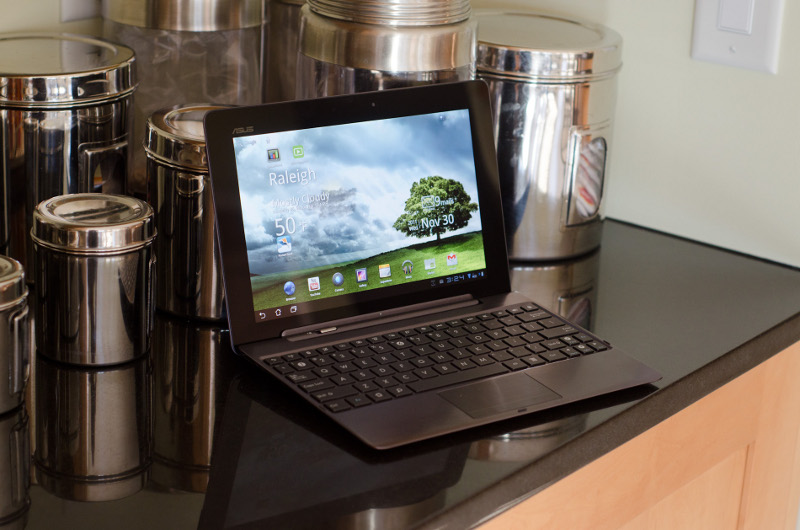
Asus Transformer Prime tablet
Enlarge picture
Since its introduction, the Transformer Prime has received a lot of complaints about its more than unimpressive GPS performance, so recently an Internet publication has started an investigation to find out what causes these problems, its conclusions showing that a design fault of the tablet is to blame.

As AnandTech has discovered, the problems with the GPS reception of the Prime seem to be caused by its aluminum construction which prevents the radio waves sent by satellites to be accurately received by the tablet.

While the sheet of metal that is used for the Prime isn’t very thick, aluminum is very good when it comes to blocking radio waves, and Asus has placed the GPS antenna right behind such a panel.

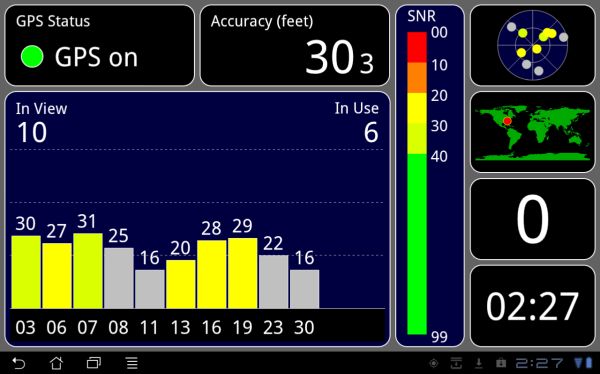
Asus' original Transformer in-car GPS test
Enlarge picture
According to AnandTech, this causes the bad reception that most Prime users have complained about, and the problem can only be fixed through a redesign of the tablet that is very unlikely to happen at this point in time.

Apple also faced a similar problem when its built the 3G iPad 2 (the WiFi-only version comes without built-in GPS), but avoided such reception issues by placing the GPS antenna behind a black plastic strip, since this material causes a lot less interference to radio waves than aluminum.

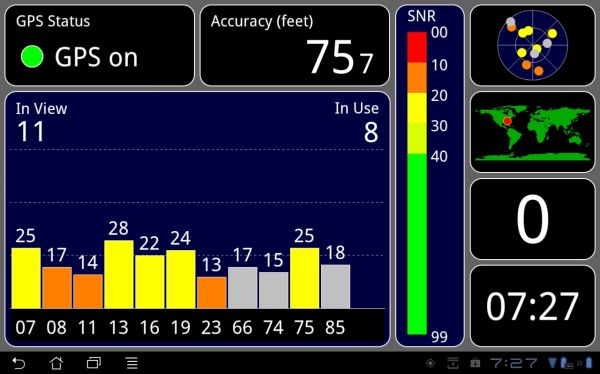
Asus' Transformer Prime in-car GPS test
Enlarge picture
Why Asus hasn’t gone with a similar design is anybody’s guess, but the tests that AnandTech run on the Transformer Prime show it lagging severely behind the original Transformer when it comes to GPS connectivity, even if both of these tablets use the same Broadcom BCM4751 GPS receiver, this chip also being used by Apple in the iPad 2.

Asus has recently issued an update that is said to address the GPS performance of the Prime, but this only ensures that ephemeris (used to calculate satellite position) and almanac (details for all GPS satellites) data are downloaded over WiFi to speed up the process of determining your current position.

Needless to say, this update doesn’t do much without network assistance when is forced to rely on the low transfer rates (50 bits per second maximum) of GPS satellites, which are lowered even more when passing through the Prime’s aluminum case.
8,371 hits · 11 comments
Link to this article · Print article · Send to friend

MUST-READ RELATED ARTICLES:


Office Depot Continues to List Transformer Prime, Still Doesn't Have It

Asus Transformer Prime Android 4.0 ICS Update Due January 12

Asus Responds to Transformer Prime’s Locked Bootloader, Battery & GPS Issues

Sony Cuts Tablet S Price by $100 (€76.8), Now Starts at $399 (€306)

Toshiba’s Upcoming Nvidia Tegra 3 Tablet Presumably Spotted

READER COMMENTS:


Comment #1 by: miffedTPowner on 05 Jan 2012, 08:27 UTC reply to this comment

I can't believe that ASUS didn't test the GPS functionality before releasing this tablet. It appears that they just rushed it to market. How could they not know the GPS doesn't work? Now I see that they removed GPS from the list of specs on the Prime! What about those of us that bought one expecting GPS to work?


Comment #2 by: Wedgy on 05 Jan 2012, 20:26 UTC reply to this comment

My new prime has no GPS issues. I'm in a concrete building and Google maps tells my my location in the building. I believe that there are people having problems - I'm just not one of them - jp - Seattle, WA

Comment #2.1 by: glsterling20 on 06 Jan 2012, 17:33 GMT

Wedgy,

You state that the GPS function on your new Transformer Prime works great in
"a concrete building." Be honest with us, are you usually connected to WiFi when testing the GPS function in this particular concrete building? The reason I'm asking is because this article and ASUS have stated that turning on the WiFi will help the Navigation software estimate your position more quickly. Assuming your not just someone trying to promote the Transformer Prime, if you will humor us, please turn off your WiFi on your Prime and try the Navigation software then. Then try the Navigation software with the WiFi turned on, connected to a network, and not connected to a network. Let us know if there is a difference in the amount of time it takes for the Navigation Software to tell you were it thinks you are at. If you could also do these test while in a moving vehicle (not driving of course) and tell us how that went as well that would be great.

To anyone else who reads this comment and has a Transformer Prime, if you could conduct similar test, this may help us whom are trying to purchase the prime make a decision on whether or not we will still want to pursue this tablet. Thanks.

Comment #2.2 by: syn on 06 Jan 2012, 22:26 GMT

To properly test the gps, u need to put the prime on airplane mode. I did with mine and it did not work even when outdoors.

Comment #2.3 by: mike on 07 Jan 2012, 01:05 GMT

Umm, did you turn off your wifi while using Google maps? If not, your location was determined by your network connection. Try using a GPS status app to see the received signal strength (or lack thereof) of the GPS satellites. You won't see any.

Comment #2.4 by: Aj on 07 Jan 2012, 03:53 GMT

Hi,

Have you tested the GPS on the move? And how is WiFi reception? People say signal drops quite often and data speed is less than any other device connected to the same network.


Comment #3 by: RogerRamJet on 06 Jan 2012, 00:08 UTC reply to this comment

Well that has just trashed my plans to get this tablet. One of the main justifications was to be able to use the tablet as a GPS. The iPad 2 is looking the more likely option now, and I can't tell you how much it pains me that I'd be giving any of my money to Apple...

Comment #3.1 by: PrimeTime on 09 Jan 2012, 00:16 GMT

I have a Transformer Prime and the GPS works fine. I tested it recently on my commute from home from downtown Seattle to my home (about 20 minutes). The GPS locked on to my location quickly and tracked my progress during the entire route.


Comment #4 by: asushater on 09 Jan 2012, 18:13 UTC reply to this comment

asus should recall all products


Comment #5 by: TI on 24 Feb 2012, 06:57 UTC reply to this comment

I think that this is too bad as the machine is otherwise a very nice unit


Comment #6 by: fern on 30 Mar 2012, 13:23 UTC reply to this comment

Mine gets absolutely NO GPS signal. I sent mine in for RMA, they sent it back saying nothing was wrong, still no working GPS......take a look at the sheer volume of BBB complaints against ASUS, there are so many unresolved complaints that they have been barred from ever getting an accreditation through the BBB......that should speak volumes, the sandy bridge fiasco completely decimated the asus RMA department.

There's also a class action lawsuit for anyone who's purchased their prime expecting the GPS functionality ASUS was advertising, you can join it here, I urge EVERYONE who purchased a prime to join this lawsuit and let asus know they cant get away with this kind of lack luster * poor product development, you all paid about $75 for that GPS feature.......time to get that money back:

http://www.courthousenews.com/2012/02/13/ColinvASUS.pdf

Copyright © 2001-2013 Softpedia. Contact/Tip us at

WindowsGamesDriversMacLinuxScriptsMobileHandheldNews

SUBMIT PROGRAM   |   ADVERTISE   |   GET HELP   |   SEND US FEEDBACK   |   RSS FEEDS   |   UPDATE YOUR SOFTWARE   |   ROMANIAN FORUM