
Softpedia
 

NEWS CATEGORIES:


NEWS ARCHIVE >>
SOFTPEDIA REVIEWS >>
MEET THE EDITORS >>
Home > News > Apple > Portable > Notebook

November 5th, 2008, 11:42 GMT · By

Apple: We're Going to Fix MacBook Trackpad Issues

SHARE:

Adjust text size:


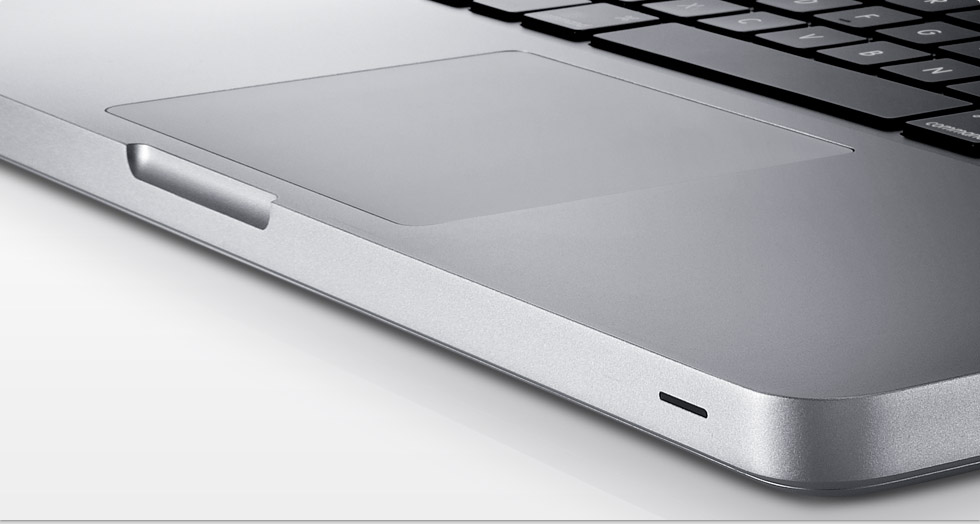
Apple next-gen MacBook 13-inch (trackpad highlighted)
Enlarge picture
What Apple touted as an innovative feature of the new MacBook line, the button-free glass trackpad, has proven to be the source of numerous disappointments regarding the new line of notebooks. While Apple was coy about admitting the issues at first, reliable sources indicate that the company is now responding to the widespread problem of trackpads that don't register clicks.

At first, only a couple of users dared report issues with their new MacBooks. Soon after, forums were filled with complaints from people who claimed the glass-covered trackpad on their MacBook was failing to register clicks, reports PCPro.

"Every 50 clicks, my trackpad will stop responding for five to clicks," reports one poster. "Generally this will resolve itself given a few seconds, and is not directly dependent on number of times the trackpad is clicked while unresponsive."

"This click problem is driving me insane,” another user says. “I don't even attempt to use this machine unless I'm at a desk using a mouse. On the couch, I use my old Macbook Pro. They better fix this."

One user actually went on to e-mail Apple's CEO on the issue. Steve Jobs apparently called up on the support staff, and had them get in touch with the user by phone. According to the user, Apple's employee said the company would be "researching the clicking issue," but that "they have no resolution of it." Allegedly, the representative also took a cautious stand, telling the user "there’s not really an official acknowledgment of it," therefore they couldn’t help him for the time being. Nevertheless, "they are checking into it because they’ve heard the complaint frequently," the same user reported.

On a very short notice, however, Apple seems to have acknowledged the issues as widespread, with World of Apple reporting that “today the situation has been fortified further as an email coming from Steve Jobs’ email account reveals that a 'software fix is coming soon'."

TELL US WHAT YOU THINK:

3,401 hits · 3 comments · Link to this article · Print article · Send to friend · Subscribe to news

MUST-READ RELATED ARTICLES:


MacBook Owner E-Mails Jobs on Trackpad Issues, Gets Called Back

Pet Planets Are up in Tamagotchi: ‘Round the World for iPod

Speculation: Father of the iPod 'Asked' to Step Down

Apple Solves Life's Dilemmas with iPhone 3G

Digital Camera RAW Compatibility Update 2.3 Available – Download Here

READER COMMENTS:


Comment #1 by: Joe on 12 Aug 2009, 13:06 UTC reply to this comment

This is one time where Apple innovation actually took a step backwards. The old trackpad and fixed button for mouse clicks was far more user friendly. I am sticking with my old Macbook Pro until Apple realizes this.


Comment #2 by: kB on 03 Sep 2009, 21:40 UTC reply to this comment

The trackpad firmware update did not solve the problem. I took my macbook pro back a week after I bought it and they said it was fine. It was not but I was leaving the country. I switched for another. I can't click and drag unless it is the far right corner. Many miss-clicks and errors. 70% nothing after a click. It feels like a physical defect.
It irritates me that on my 10th mac, Apple still denies issues until people are frustrated.


Comment #3 by: Swiley on 31 Dec 2009, 06:37 UTC reply to this comment

I am not seeing anyone mentioning a problem of where the pointer will freeze up and any movements tried on the track pad only zooms the screen up or down. This happens CONSTANTLY and is driving me F'N CRAZY! It causes countless problems/errors when navigating web pages, playing games or using any software program. The screen will NOT stop zooming up or down and I can not find anyone with a solution. Anyone have any suggestions short of putting this damn thing under the tire of my truck and... (it's done it twice already in trying to type). Any help would be appreciated.

Thank you.

Copyright © 2001-2012 Softpedia. Contact/Tip us at

WindowsGamesDriversMacLinuxScriptsMobileHandheldNews

SUBMIT PROGRAM   |   ADVERTISE   |   GET HELP   |   SEND US FEEDBACK   |   RSS FEEDS   |   UPDATE YOUR SOFTWARE   |   ROMANIAN FORUM