
Search Perform an advanced search query SOFTPEDIA
 
SOFTPEDIA
Updated one minute ago
HomeSubmit a program for being reviewedAdvertise on our websiteGet help on surfing our websitesSend us your feedbackGet information about our XML/RSS backend and how to use itBrowse the news archiveVisit our discussion forumVizitati forumul in limba romana


KLIP
  1. HOME
  2. SCIENCE
  3. TECHNOLOGY
  4. WEBMASTER
  5. SECURITY
  6. MICROSOFT
  7. LINUX
  8. APPLE
  9. GAMES
  10. TELECOMS
  11. REVIEWS
  12. LIFE & STYLE
  13. EDITORIALS
  14. INTERVIEWS
  15. RSS
Welcome!
Hello, Guest

Login if you have a Softpedia.com account.

Otherwise, register for one.

MAC

Apple Releases iPhoto, ProKit and Braille Display Updates

- Tweaks and fixes for the first two, additional refreshable Braille displays for the latter

By: Filip Truta, Apple News Editor

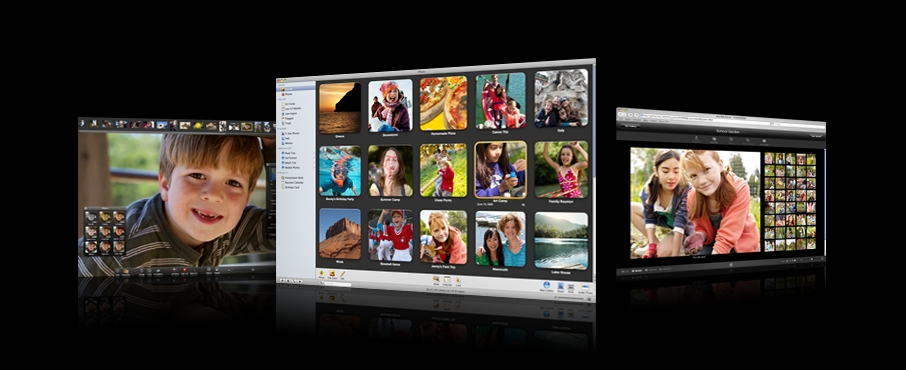
Apple has released three updates via Mac OS X's Software Update. iPhoto 7.1.2 addresses issues with publishing photos, improving overall stability. ProKit 4.5 adds reliability to Apple's professional applications. Braille Display Update 1.0 delivers a bit more than the other two updates, particularly adding refreshable Braille displays.

Apple wants you to have fun with photos, not experience
headaches when trying to share them by email or create web pages, cards and calendars using them. Thus, iPhoto automatically organizes your photo library and makes editing as easy as clicking your mouse — so you can get the most out of even the biggest collection, according to the electronics giant.

So, you're probably wondering what's new in this version of iPhoto. Well, as mentioned above, iPhoto 7.1.2 addresses issues when publishing photos to a Mac Web Gallery and improves overall stability. Other minor aspects, negatively reported by users of this app, have also been tweaked up and fixed.

ProKit 4.5, on the other hand, improves reliability for Apple's professional applications and is recommended for all users of Final Cut Studio, Final Cut Express, Aperture, Logic Studio and Logic Express.

As for the Braille Display Update (1.0), it adds support in Mac OS X v10.5 Leopard for a total of eleven additional refreshable Braille displays.

Mac OS X v10.5 Leopard includes a powerful screen reading technology for the blind called VoiceOver. VoiceOver supports a variety of refreshable Braille displays, so when you have a supported Braille display connected to your computer, VoiceOver automatically detects it and sends it information about what is displayed on the screen.

The update adds support in Leopard for the following additional refreshable Braille displays: GW Micro BrailleSense, GW Micro SyncBraille 20 , GW Micro SyncBraille 32, HandyTech Easy, Braille, HandyTech Braille Star 40, HandyTech Braille Star 80, HIMS BrailleSense, HIMS, SyncBraille 20, HIMS SyncBraille 32, Nippon Telesoft Seika Version 3 and Papenmeier Braillex Trio.

MORE RELATED ARTICLES: Apple TV Sees Mediocre Sales Analysts Already See Apple and Nokia Fighting Over Touch-Screen Technology Is Apple Even Trying to Lock iPhones? Apple And Burst.Com Finally Settle Apple Planning More International Retail Stores China Mobile Still In Talks With Apple Apple Tracking Users Activity
 
Comments | Link here | Subscribe
Print | Send to friend
Today's News | Yesterday's News

Search:


6th February 2008, 10:03 GMT | Copyright (c) 2008 Softpedia | Contact:
Read by 438 user(s) | Rating: | 4 vote(s) so far | Cast your vote:
Apple Releases iPhoto, ProKit and Braille Display Updates - USER OPINIONS


We are sorry, there are no opinions available for this article.


SHARE YOUR OPINION ABOUT Apple Releases iPhoto, ProKit and Braille Display Updates

Since you are not logged on, your comments will have to be approved before being displayed.
Click here to login, or register.
Your Name:
Your Email:
Type in the result:
Your Opinion:


DO YOU WANT TO CONTACT US?  

If you have some comments or you want to send us some information you can send us an email directly to .
You can use the form below for the same purpose.
Your full name: (at least 3 characters)
Your email address: (at least 5 characters)
Message subject: (at least 5 characters)
Message text:
(at least 10 characters)
Type in the result:


© 2001 - 2008 Softpedia. All rights reserved.
Softpedia™ and Softpedia™ logo are registered trademarks of SoftNews NET SRL.
Copyright Information | Privacy Policy | Terms of Use | Contact Softpedia | Update your software | Archive