
Softpedia
 

NEWS CATEGORIES:


NEWS ARCHIVE >>
SOFTPEDIA REVIEWS >>
MEET THE EDITORS >>
TRENDING TODAY
Home > News > Apple > Apple & Mac Blog

February 21st, 2013, 01:41 GMT · By

BLOG

Apple Releases Fix for IPv6 Tunnel Error Under AirPort 7.6.3

SHARE:

Adjust text size:


Apple AirPort graphics Enlarge picture - Apple AirPort graphics
AirPort / Time Capsule owners experiencing an IPv6 Tunnel Error after installing firmware 7.6.3 in router/NAT mode should be glad to learn that Apple has finally posted an official fix / workaround.

Resolving the IPv6 Tunnel error after upgrading to firmware 7.6.3 in router/NAT mode seems to require a bit of patience on the user’s end, as Apple’s KB article HT5656 lists numerous steps and warnings.

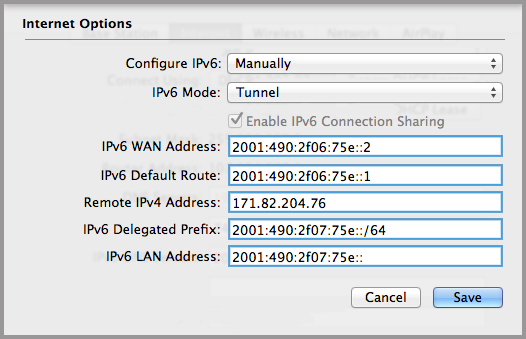
In the most common scenarios, affected users will be required to obtain the correct settings from their IPv6 service provider and enter the IPv6 WAN address, IPv6 Default Route, Remote IPv4 Address, IPv6 Delegated Prefix, and IPv6 LAN Address into the necessary fields (as shown in the screenshot above).

Another set of instructions is then provided. Users must ultimately enter the IPv6 WAN Address and other information (such as the Default Route) received from the service provider. Apple clarifies that “All boxes must be filled in correctly.”

TELL US WHAT YOU THINK:

1,878 hits · Link to this article · Print article · Send to friend · Subscribe to news

MUST-READ RELATED ARTICLES:


iOS 7 “Social Hub” Concept Begs to Be Turned into Reality

This Is What the iWatch Should Look Like

Jony Ive’s iOS 7 Home Screen Should Look like This

iPad mini 2 Panels Now in Production, AUO Improves Yield Rates

New Trojan Targets Macs, Apple’s XProtect Doesn’t Detect It

READER COMMENTS:


No user comments yet.
Be the first to express your opinion!
Copyright © 2001-2013 Softpedia. Contact/Tip us at

WindowsGamesDriversMacLinuxScriptsMobileHandheldNews

SUBMIT PROGRAM   |   ADVERTISE   |   GET HELP   |   SEND US FEEDBACK   |   RSS FEEDS   |   UPDATE YOUR SOFTWARE   |   ROMANIAN FORUM