 14 DAY TRIAL //
 So you've upgraded to iPhone software 2.0, downloaded the App Store and started browsing it, only to stumble upon a strange app, simply dubbed Remote, huh? Go ahead, download it with confidence ? Apple itself developed it for you to use on your iPhone and control the iTunes library on your Mac, as well as the sound system you own.
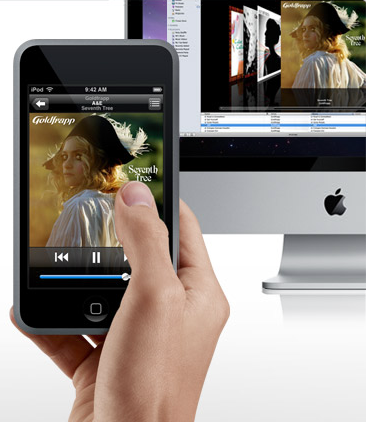
From Apple's iPod + iTunes section: "Be a mobile DJ. With Remote, you can control the music on your computer or Apple TV from your iPod touch or iPhone. Play, pause, skip, shuffle. See your songs, playlists, and album art on your iPod touch or iPhone as if you were right in front of your computer. Remote is free and works with your Wi-Fi network, so you can control playback from anywhere in and around your home."
The guys at TUAW say they've even given it a go with a set of AirTunes speakers, controlling where the music was routed to, and it worked like a charm, according to the unofficial weblog. The source added that although it sounds simple, once you have it up and running for you, it's going to be a blast using it.
The application only uses Wi-Fi to control your iTunes music library on your Mac, and does so only after you pair the iPhone and Mac by entering a code from your iPhone into iTunes.
According to Apple, Remote uses the same music playback controls you?re familiar with on iPod touch or iPhone, it allows you to search your entire iTunes music library by just tapping the name and selecting the song. It even lets you control the music on your Apple TV from anywhere in your home. You can "pause a song from the bedroom" and "resume play from the kitchen" to "enjoy total remote control," Apple explains.
Visit the newly launched App Store on your iPhone (software 2.0 required) to download Remote. The application is free of charge.