
NEWS CATEGORIES:


NEWS ARCHIVE >>
SOFTPEDIA REVIEWS >>
MEET THE EDITORS >>
Home > News > Linux > Linux Distributions

Linux Distributions


Announcing Ubuntu Eee 8.04.1

The perfect operating system for your Asus Eee PC!

By Marius Nestor, Linux Editor

8th of September 2008, 14:13 GMT

Adjust text size:


Ubuntu Eee 8.04.1
Enlarge picture
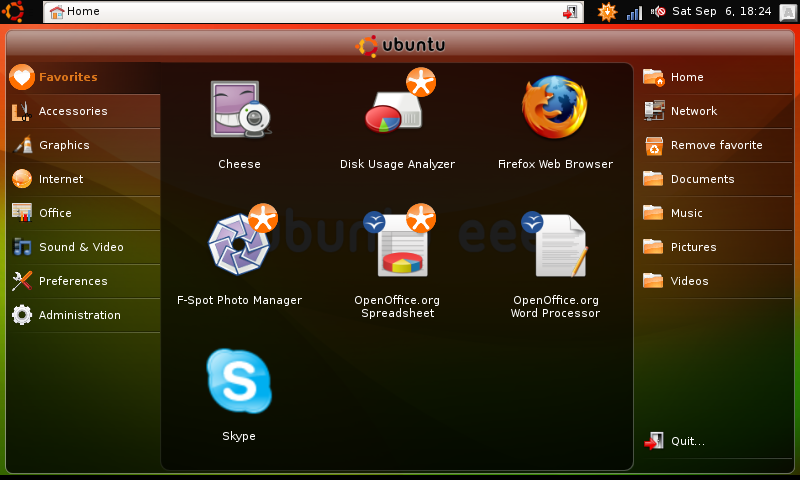
Based on the Ubuntu 8.04.1 LTS (Hardy Heron) and compatible with its repositories, the Ubuntu Eee 8.04.1 operating system has been released today, and it is optimized for the tiny Asus Eee PC. The new version introduces a new interface, supports even more Asus Eee PCs than before, boots faster, and takes up less space. Not only that, but it also has everything we'd expect from an operating system, such as:

· Mozilla Firefox 3.0 (web browser)
· Mozilla Thunderbird (mail client)
· Pidgin (multi-protocol instant messenger)
· Skype (VoIP telephony and instant messenger)
· Transmission (BitTorrent client)
· OpenOffice.org (office suite)
· F-Spot (photo manager)
· Cheese (webcam capture)
· Movie and Music Player
· Desktop notes

"Ubuntu Eee is not only Ubuntu optimized for the Asus Eee PC. It's an operating system, using the Netbook Remix interface, which favors the best software available instead of open source alternatives (ie. Skype instead of Ekiga)." - says Jon Ramvi, Ubuntu Eee developer.

Ubuntu Eee looks nice and acts like it's supposed to – fast and furious! Unfortunately, we didn't have an Asus Eee PC to really test this operating system, but we have installed it instead on an ordinary computer. The installation is the same as the regular Ubuntu one.

The home page of Ubuntu Eee offers a lot of interesting and useful tutorials, and a couple of fixes as well (if you want to further customize it or to improve some things). Go check it out here!

So, if you own an Asus Eee PC, go get your copy of Ubuntu Eee 8.04.1 right now from here. It's FREE! Oh, and don't forget to drop us a line or two about your experience with it.

TAGS:

Ubuntu Linux | Linux distribution | Asus Eee PC | operating system | open source
Read by 11,638 user(s) | Add comment | Link to this article TWEET THIS


Article rating:
Good (3.9/5) 10 vote(s)    

Subscribe to news | Print article | Send to friend

© Copyright 2001-2010 Softpedia
Contact:


SEARCH THE NEWS ARCHIVE :


Today's News
| Yesterday's News | News Archive


MORE RELATED ARTICLES:


BOSS Linux 3.0 Comes with KDE and GNOME

Major Upgrade: Sun's VirtualBox 2.0

The Linux Foundation Welcomes Canonical

Canonical Presents Launchpad 2.0

Kernel Vulnerability in Ubuntu 8.04, 7.10, 7.04 and 6.06 LTS. Upgrade Now!

Fedora Unity Releases New Re-Spin DVD of Fedora 9

KDE 4.1.1 Comes with Performance Improvements

Test Driving Zenwalk 5.2 Beta GNOME Edition

User opinions:


Comment #1 by: redmistpete on 03 Oct 2008, 00:50 GMT reply to this comment

I installed ubuntu eee on my Asus EeePC 900 from an ISO, which I had burned to CD. Didn't follow any tutorials and the installation was very quick and easy. When it booted up, everything worked straight away!! All the special function keys work - wireless and camera work and the resolution is correct. The interface is perfect for the EeePC. It's kind of a hybrid between the default Xandros (tabbed menu) and full ubuntu - the desktop is split into 3 main areas by a transparent, full-screen 'start menu' which overlays on top of the desktop image. The left panel has all the Tabs for applications and categories (internet, accesories, graphic, etc), the right panel houses the file browser tabs with various drives, folders and networks (places), while the larger middle section has all the application icons. When selecting an icon, it spins round pleasantly while the app launches. The task bar is at the top with a show desktop menu button (left), easy reference tabs for running tasks (middle) and a system tray with volume control and caps-lock/num-lock/scroll status indicator (right). Most of the default apps are good butI chose to replace the 'Rhythmbox' music player with 'Amarok' and the 'Totem' movie player with 'SMplayer' as well as adding some extra. It 'looks' and 'feels' just right for the EeePC and adds functionality and excitement!! Just need to work out how to run compiz-fusion and it'll be perfect ;) Seriously THE BEST OS FOR EEEPC 900 ! ! I N S T A L L I T N O W ! !


Comment #2 by: SupaM on 24 Oct 2008, 20:35 GMT reply to this comment

I installed ubuntu eee on my EeePC 701 4gb surf, because I was pretty disappointed with default system ( xandros ). After installation there is aprox. 1.4 gb free on 4gb ssd hard. I used bootable USB which is really easy to built. All you need is a 1 gb (min) usb flash drive, unetbootin( to make bootable usb), and of course Linux ubuntu eee installation.
All drivers are installed with system, so after installation all system works just fine. Interface is easy to use, and offers much more than xandros.
It is definitely the best OS for EEEPC!!!


Comment #3 by: cslaw on 28 Oct 2008, 01:34 GMT reply to this comment

Could I install Wine in ubuntu eee? I have application that must be in WinOS.


Comment #4 by: Matt on 06 Dec 2008, 22:23 GMT reply to this comment

the OS is great! Great experience. I just had one problem, it didn't detect my camera.


Comment #5 by: Ophir on 17 Dec 2008, 07:13 GMT reply to this comment

I moved to Ubuntu from a previously installed Windows XP. I know I might be linched here, but so far I do not see any advantages over the XP and the Firefox functions even worse than IE7 or Chrome on the eee 701. I'm still givving it a chance, but seriously considering moving back to (good?) old XP.


Comment #6 by: Joe-G on 06 Jan 2009, 00:01 GMT reply to this comment

Your not got going to see a big advantage using Ubuntu Linux (or any other flavor of Linux) over Win XP, Until you click on the wrong attachment in your Win XP browser and get infected with a bug. As far as Firefox working worse than IE you'd be the 2nd person I ever met that felt that way. Until they tweaked Firefox which you can do with an open source product but can't in IE

Share your opinion:

Your Name:
Your Email Address:
(will not be used for commercial purposes)
Solve this to prove you're not a bot: =
Your review/opinion:


Windows tabGames tabDrivers tabMac tabLinux tabScripts tabMobile tabHandheld tabGadgets tabNews tab

SUBMIT PROGRAM   |   ADVERTISE   |   GET HELP   |   SEND US FEEDBACK   |   RSS FEEDS   |   ENTER NEWS SITE   |   ENGLISH BOARD   |   ROMANIAN FORUM