
Search Perform an advanced search query SOFTPEDIA
 
SOFTPEDIA
Updated one minute ago
HomeSubmit a program for being reviewedAdvertise on our websiteGet help on surfing our websitesSend us your feedbackGet information about our XML/RSS backend and how to use itBrowse the news archiveVisit our discussion forumVizitati forumul in limba romana


KLIP
  1. HOME
  2. SCIENCE
  3. TECHNOLOGY
  4. WEBMASTER
  5. SECURITY
  6. MICROSOFT
  7. LINUX
  8. APPLE
  9. GAMES
  10. TELECOMS
  11. REVIEWS
  12. LIFE & STYLE
  13. EDITORIALS
  14. INTERVIEWS
  15. RSS
Welcome!
Hello, Guest

Login if you have a Softpedia.com account.

Otherwise, register for one.

WEB RESOURCES

An Efficient Wikipedia Browser

- Discover Indywiki

By: Catalin Bocanu, Web News Editor

As you already know, Wikipedia is a free online encyclopedia that is based on the open content concept. You can browse the site using its own navigation menu or search for information with the help
of integrated search box inside your favorite web browser. Currently, there are also other possibilities to find and access information contained on Wikipedia website.

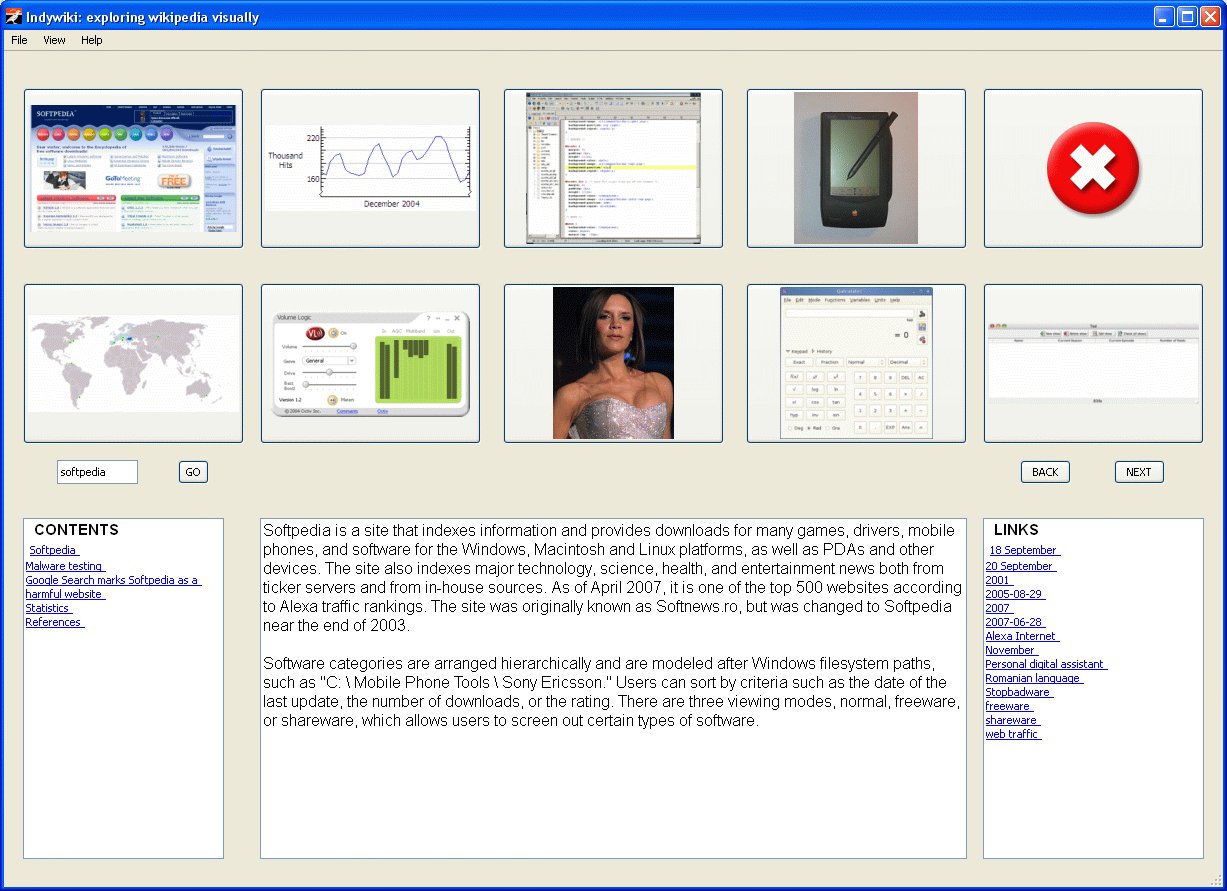
Indywiki is a standalone application that provides a different manner of browsing and finding articles on Wikipedia. This application is made in Python (a very powerful, popular and easy programming language) and the graphical user interface depends on PyQt. Indywiki implements the concept of "visually browsing" of Wikipedia pages.

In order to use this Wikipedia browser, first you must download the Indywiki distribution package suitable for your operating system. Indywiki does not depend on any operating system due to the GUI made with PyQt, thus it can be easily deployed on Windows, Linux and MacOS. After you enter a search term into the search box, and press the enter key, the search results are returned as images and links distributed across four sections in the application GUI. The first image is the most relevant to the topic searched and the corresponding article displayed.

On the left text box there will be displayed links corresponding to certain article sections and in the right text box, the links present in the article content. The related articles are parsed and their first image is shown. If you will click the links related to a certain search term (from the right text box) a new search will take place. The same behavior will have the application when you click an image.

You can also change the Wikipedia site (by selecting one adequate for your native language) and the progress bar can be removed. These are the single options available for application behaviour customization. Due to the fact that the source code is offered for free, you can try to modify the GUI in order to add more functionalities to this application.


MORE RELATED ARTICLES: Get Over 4GB of Free Online Storage with Mozilla Firefox Get A Free Firefox Add-Ons Visual Builder Mozilla Labs A New Blogging Method with ScribeFire and Firefox The End of Animated GIF Images Decade Bookmark Management and Sharing with del.icio.us A Promising Alternative for Google Reader Get a Free Tool to Automate Your Internet Presence Free Professional Tools for Websites Creation and Management Cascading Style Sheets Validation with Adobe Dreamweaver CS3
 
Comments | Link here | Subscribe
Print | Send to friend
Today's News | Yesterday's News

Search:


30th January 2008, 17:48 GMT | Copyright (c) 2008 Softpedia | Contact:
Read by 511 user(s) | Rating: | 2 vote(s) so far | Cast your vote:
An Efficient Wikipedia Browser - USER OPINIONS


We are sorry, there are no opinions available for this article.


SHARE YOUR OPINION ABOUT An Efficient Wikipedia Browser

Since you are not logged on, your comments will have to be approved before being displayed.
Click here to login, or register.
Your Name:
Your Email:
Type in the result:
Your Opinion:


DO YOU WANT TO CONTACT US?  

If you have some comments or you want to send us some information you can send us an email directly to .
You can use the form below for the same purpose.
Your full name: (at least 3 characters)
Your email address: (at least 5 characters)
Message subject: (at least 5 characters)
Message text:
(at least 10 characters)
Type in the result:


© 2001 - 2008 Softpedia. All rights reserved.
Softpedia™ and Softpedia™ logo are registered trademarks of SoftNews NET SRL.
Copyright Information | Privacy Policy | Terms of Use | Contact Softpedia | Update your software | Archive