 14 DAY TRIAL //
 Images used on websites are usually the subject of many long discussions concerning the influence of image file size and format over the entire site performance, due to low pages' loading speed or existence of accessibility issues.
Portable Network Graphics (PNG) format has many features to offer when you need to implement various types of images on your web pages. The PNG image file format was created to replace the GIF (Graphics Interchange Format), because it does not provide the desired performance in many situations.
Portable Network Graphics format is based on a lossless compression algorithm that maintains the original image quality corresponding to a small file size after compression. An advantage over GIF images is the higher compression resulting in a smaller file size, but PNG images do not support multiple images on the same file and as a consequence, the PNG files cannot include animations, as compared to GIF images.
PNG images supports true colors up to 64 bit, gray scale and indexed colors. They also provide support for progressive rendering (two dimensional interlacing), which will determine an earlier image display during the web page loading and an alpha channel that allows multiple ways to manage image transparency property. The variable image transparency property helps you apply various effects to your PNG images. PNG images have an automatic built-in cross platform gamma correction feature. This feature solves the accessibility problems which appear due to different rendering methods for images with inadequate balance between brightness and contrast.
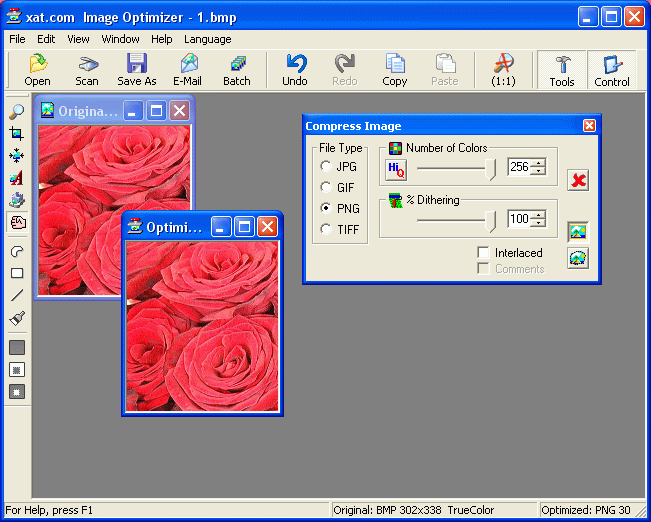
The modern web browsers are compatible with all features of PNG images, rendering them correctly, but there are older web browsers that do not offer full support for PNG yet. You can also use image optimizers that will help you manage all aspects of PNG images, such as dithering, color depth, interlacing and more. By obtaining the optimal combination of all features of PNG images you can achieve maximum performance in image quality at a reasonable file size, still adequate for web use.