
Softpedia
 

NEWS CATEGORIES:


NEWS ARCHIVE >>
SOFTPEDIA REVIEWS >>
MEET THE EDITORS >>
TRENDING TODAY
Home > News > Microsoft > Software Blog

November 26th, 2012, 13:47 GMT · By Bogdan Popa

BLOG

Add Your Steam Games to the Windows 8 Start Screen with Pin Steam

SHARE:

Adjust text size:


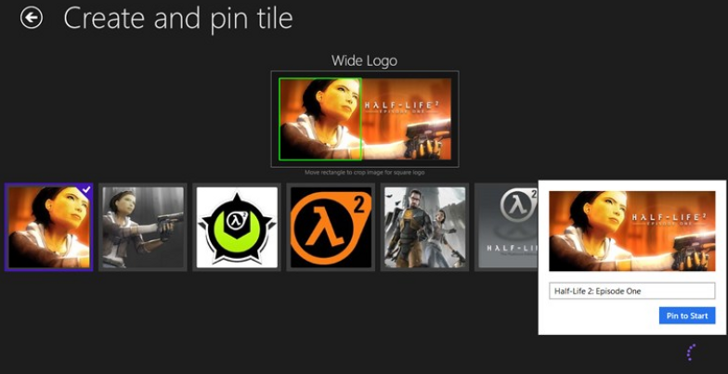
The app is available in the Store for any Windows 8 user Enlarge picture - The app is available in the Store for any Windows 8 user
Pin Steam is a very easy-to-use Windows 8 application that allows users to create a live tile on the Start Screen in order to quickly access their favorite Steam games.

Once installed and launched, Pin Steam asks for your Steam ID, so it scans the account and displays all available games in a clean and intuitive interface.

Simply select the game you wish to pin to the Start Screen, choose a live tile from its impressive collection of photos and you’re good to go. Keep in mind that this app shows all games available in your Steam account, regardless if they are installed or not.

The app comes with a price tag of $1.49 (€1.1) and is available in the Store for anyone running a Windows 8 copy on x86, x64 or ARM devices.

TELL US WHAT YOU THINK:

2,799 hits · Link to this article · Print article · Send to friend · Subscribe to news

MUST-READ RELATED ARTICLES:


Windows 8 Is Indeed a Gaming Catastrophe – Game Developers

Microsoft Changes Its Mind, Allows “Mature” Games in Windows 8 Store

Windows 8 Sales Are Well Below Expectations – Market Analyst

Windows 8 Apps Recount: Only 13,000+ Apps Available

The 60-Second Microsoft Roundup: Black Friday, Windows 8 Security Flaw and More

READER COMMENTS:


No user comments yet.
Be the first to express your opinion!
Copyright © 2001-2013 Softpedia. Contact/Tip us at

WindowsGamesDriversMacLinuxScriptsMobileHandheldNews

SUBMIT PROGRAM   |   ADVERTISE   |   GET HELP   |   SEND US FEEDBACK   |   RSS FEEDS   |   UPDATE YOUR SOFTWARE   |   ROMANIAN FORUM