
Softpedia
 

NEWS CATEGORIES:


NEWS ARCHIVE >>
SOFTPEDIA REVIEWS >>
MEET THE EDITORS >>
Home > News > Webmaster > Yahoo News

April 21st, 2011, 13:30 GMT · By

Add Custom Background Images to Emails with Yahoo Mail Beta

SHARE:

Adjust text size:


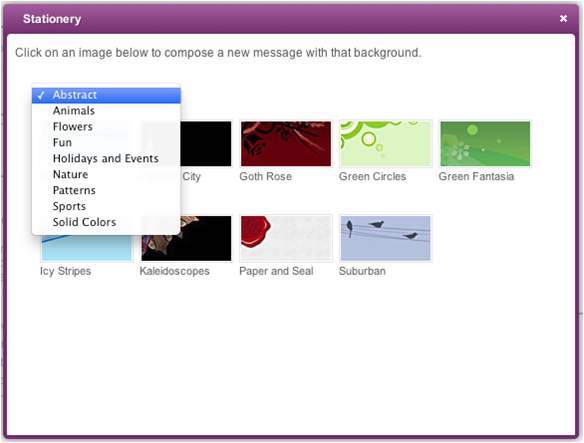
Stationery is back in Yahoo Mail
Enlarge picture
One of the reasons why people like Yahoo Mail is that it doesn't take itself to seriously and has a lighter and fun side as well. For example, you can use funky, colorful fonts in your emails and the interface is equally visually rich.

Another tool you could use to spice up your messages is Stationery, which enabled users to add custom background images to emails.

Stationary is now back in Yahoo Mail Beta, which was missing the feature, and can be found in the list of apps available to all users.

"With the latest release of Yahoo! Mail Beta, one new feature that is now included is the ability to add stationery (background colors and image templates) to your messages," Miriam Geller, Director of Product Management for Yahoo! Mail, wrote.

Using it is easy, just click on the Stationery link in the Applications list and you'll be able to choose the image you want to use. There are nine categories to choose from each with several background images so the selection is varied enough.

After you find a background to your liking, select it and you will be redirected to a new message tab with the image already added. Whomever you send it to will see the custom background image in their email client.

"Stationery is a feature that existed in the previous version of Yahoo! Mail. Since the release of Yahoo! Mail Beta, we have gotten feedback from customers asking us to bring this feature back," Yahoo explained.

With a lot of users asking for its return, Yahoo decided to bring it back. Since it already has a powerful app platform for Yahoo Mail, it was easy to implement the feature as an external app rather than build it directly into Yahoo Mail.

"We listened and are happy to report that with the help of a 3rd party developer and our Yahoo! Mail Development Platform, we were able to do just that," Yahoo said.

FILED UNDER:
Yahoo
Yahoo Mail
stationery

TELL US WHAT YOU THINK:

4,957 hits · 10 comments · Link to this article · Print article · Send to friend · Subscribe to news

MUST-READ RELATED ARTICLES:


You Can Preview Picasa and Flickr Slideshows in Yahoo Mail Beta

Yahoo Mail Beta Gets Facebook Chat, IM Conversations Archive

FilesTube Links Blocked in Yahoo Messenger

Gmail Makes It Easy to Switch and Import Emails from 14 Other Providers

Flickr Updates Sharing Options, Supports Tumblr

READER COMMENTS:


Comment #1 by: Yahoo User on 22 Apr 2011, 12:16 UTC reply to this comment

I still DONT have staitonary in my yahoo mail beta, which is a shame as i will now have to switch back to the old mail

Comment #1.1 by: J J on 07 May 2011, 15:34 GMT

me neither :(

Comment #1.2 by: Beta on 10 Aug 2011, 11:47 GMT

Once you log in to Y! mail click the settings (Gear) icon on the Applications in the left pane. There you can add or remove applications you want.

Comment #1.3 by: lewisrat2003 on 26 Apr 2012, 16:08 GMT

Are we not able to set a stationary as a default so that it is used on every email you send, or can we only add stationary to new email???


Comment #2 by: J J on 07 May 2011, 15:34 UTC reply to this comment

I dont have a stationary link on my applications list ? ? ? :(


Comment #3 by: Stationery Fan ♥ on 08 Jun 2011, 00:01 UTC reply to this comment

Thank you so much! Until reading this article I simply could not find the Stationery button :/ Thank you thank you thank you!!!


Comment #4 by: ELS on 25 Jun 2011, 17:21 UTC reply to this comment

Please help us ... me too, i don't have STATIONERY ... in my applications LIST !!!

Comment #4.1 by: darfel on 03 Jul 2011, 06:17 GMT

i thought it is just me who have a problem regarding with it.. Thats why I arrive here in this page looking for something that might help me..


Comment #5 by: darfel on 03 Jul 2011, 06:15 UTC reply to this comment

I dont have the stationary apps when I upgrade it. But My friend has.. I want to switch back to the old mail but I cant do it again.. :( sobs...


Comment #6 by: lewisrat2003 on 26 Apr 2012, 16:11 UTC reply to this comment

I think we should be able to set a stationary as a default so that it is used everytime you send out an email, rather than having to add one for each new email.

Copyright © 2001-2012 Softpedia. Contact/Tip us at

WindowsGamesDriversMacLinuxScriptsMobileHandheldNews

SUBMIT PROGRAM   |   ADVERTISE   |   GET HELP   |   SEND US FEEDBACK   |   RSS FEEDS   |   UPDATE YOUR SOFTWARE   |   ROMANIAN FORUM