
Softpedia
 

NEWS CATEGORIES:


NEWS ARCHIVE >>
SOFTPEDIA REVIEWS >>
MEET THE EDITORS >>
TRENDING TODAY
Home > News > Microsoft > Windows

April 27th, 2009, 17:41 GMT · By

192 GB - Windows 7 Maximum Supported RAM

SHARE:

Adjust text size:

Windows
Enlarge picture
Windows 7 will take the maximum amount of supported system memory well beyond the limits of Windows Vista. In this regard, the high-end edition of the upcoming Windows client will play nice with just a tad short of 200 GB of Random Access Memory. At the same time, Windows 7 has been designed to work under normal parameters starting with as little as 1 GB of RAM, in order to fit onto cheap and resource-constrained netbooks. However, given proper hardware, namely if the mainboard can handle increased amounts of system memory, Windows 7 Ultimate is ready to swallow no less than 192 GB of RAM.


This is of course valid for 64-bit versions of the next iteration of Windows, running on top of x64 CPUs, according to WinSuperSite. As far as the 32-bit editions of Windows 7 are concerned, the limit continues to be 4 GB of RAM. However, even if Windows 7 correctly reports all 4 GB of RAM installed on a machine, the 32-bit versions of the platform will not be able to address all of it.

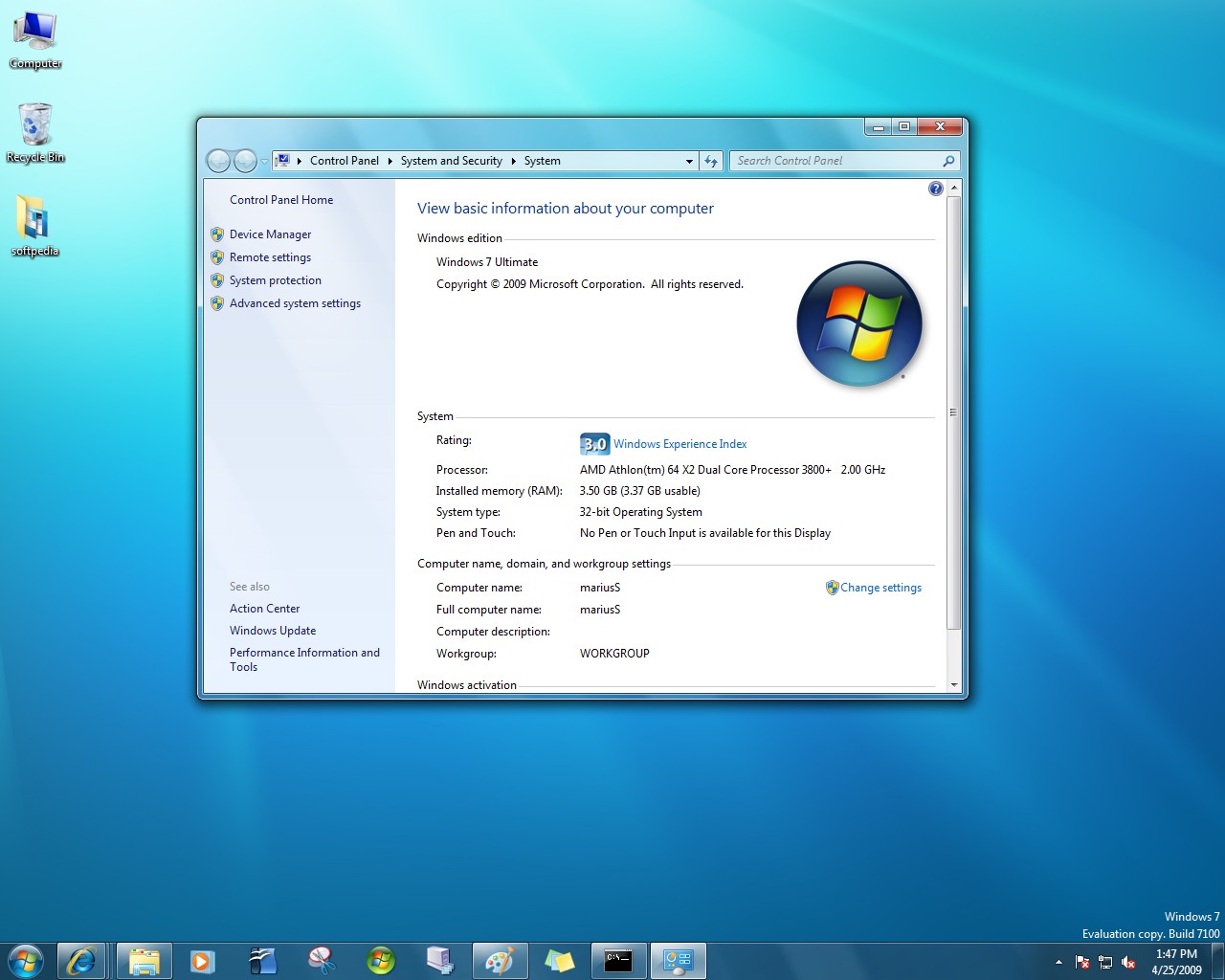
x86 architectures have a limited address space, just 4 GB in total, and they have to fit all hardware components, leaving at maximum just 3.5 GB, but more in the vicinity of 3.3 GB for RAM. As you can see in the screenshot accompanying this article, my 32-bit Windows 7 Build 7100 Ultimate is only able to address and use 3.37 GB of RAM out of the total 3.5 GB installed. This limitation is valid for all editions of Windows 7 32-bit.

Windows 7 RC Build 7100 32-bit 3.5 GB RAM
Enlarge picture
But this is not the case for the 64-bit flavor of Windows 7. The Home Basic and Starter SKUs can manage up to 8 GB of RAM, with Home Premium taking the limit to 16 GB. The Professional, Enterprise and Ultimate versions of Windows 7 will support as much as 192 GB of RAM.

By comparison, while 32-bit editions of Vista were also limited to 4 GB, 64-bit SKUs could deal with more system memory. Home Basic could take 8 GB, Home Premium 16 GB, while Business, Enterprise and Ultimate would go as high as 128 GB.

59,336 hits · 11 comments
Link to this article · Print article · Send to friend

MUST-READ RELATED ARTICLES:


Windows 7 Graphics Performance - the Evolution

Windows Can Be Used to Balance a Stick

Windows 7 Portal Is Live, Let the Learning Begin

Windows 7 RC and RTM-Branch Builds 7100 and 7106 - 223-Screenshot Gallery

Windows 7 “BitLocker To Go” Backward Compatible with XP and Vista

READER COMMENTS:


Comment #1 by: Eric R. on 27 Oct 2009, 18:15 UTC reply to this comment

I think Windows 7 is going to be another XP and hopefully more. Thank you windows.


Comment #2 by: Canivari on 28 Dec 2009, 12:06 UTC reply to this comment

Dont agree with and i quote:

"my 32-bit Windows 7 Build 7100 Ultimate is only able to address and use 3.37 GB of RAM out of the total 3.5 GB installed. This limitation is valid for all editions of Windows 7 32-bit... '"
Tak a look....
http://i777.photobucket.com/albums/yy57/canivari/Untitled.png


Comment #3 by: James Gosnell on 25 Apr 2010, 19:19 UTC reply to this comment

Why can 32bit Windows 7 only handle 4GB of ram? Seeing how 64 bit Windows 7 can handle 192 GB, 32Bit should at least be able to handle 16 or more GB of ram.

Comment #3.1 by: David on 04 Jun 2010, 23:50 GMT

The range of integer values that can be stored in 32 bits is 0 through 4,294,967,295 or −2,147,483,648 through 2,147,483,647 using two's complement encoding. Hence, a processor with 32-bit memory addresses can directly access 4 GB of byte-addressable memory.

-Wikipedia Article "32-bit"

Comment #3.2 by: Windows Geek on 09 Mar 2011, 00:07 GMT

I will partially agree with that statement. Traditionally 32-bit Windows can only address a 32-bit memory address space. BUT, you can turn on 37-bit memory addressing a Windows 32-bit using the Physical Address Extensions.


Comment #4 by: Bongie on 05 Jul 2010, 10:33 UTC reply to this comment

Please help, someone installed windows ultimate 7 on my laptop which had windows xp. Unfortunately it is logging itself out almost every hour. My laptop has 60 GB memory and initially had 512MB Ram. I have now added another IGB to make 1.5GB but that doesn't solve the problem. I have also tried to remove the AVG antivirus (which is now in my recycle bin) but that still doesn't solve the problem. Should I add more RAM (and perhaps ROM?) I am really out of my wits

Comment #4.1 by: shutup on 02 Jul 2012, 08:33 GMT

dont lie


Comment #5 by: dukereyno on 14 Mar 2011, 17:58 UTC reply to this comment

i use only 3 gb

Comment #5.1 by: WannabePro on 26 Sep 2011, 13:05 GMT

Your problem is in your display settings. You need to go to Display settings in your control panel. Click screensaver. About half way down it have a "display welcome screen" check box you need to make sure this is not checked. Hit apply at the bottom.
if this does not work. go to control panel power settings then click advanced. uncheck prompt for password on resume from standby. Hit apply.


Comment #6 by: veggiedude on 12 Jun 2011, 17:56 UTC reply to this comment

Does anyone know if this limit will be increased in Windows 8? OS X Lion doesn't need it as it's under the hood was tweaked in Snow Leopard to support an amazing 16TB.


Comment #7 by: Garfield009 on 10 Jun 2012, 14:47 UTC reply to this comment

Very good knowledge about the limitation of RAM for Window 7 32 bits

Copyright © 2001-2013 Softpedia. Contact/Tip us at

WindowsGamesDriversMacLinuxScriptsMobileHandheldNews

SUBMIT PROGRAM   |   ADVERTISE   |   GET HELP   |   SEND US FEEDBACK   |   RSS FEEDS   |   UPDATE YOUR SOFTWARE   |   ROMANIAN FORUM