 14 DAY TRIAL //
 The new Find My iPhone feature targeting users who lose their device (or have it stolen from them) is now live, according to a Modmyi forum poster. The user allegedly gave the feature a try and, according to the post, it’s a go.
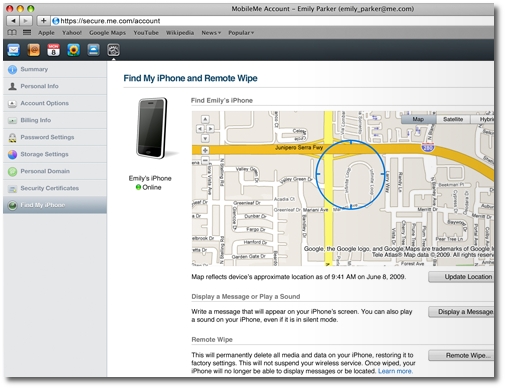
“As of 22:55 PDT, Apple has enabled Find My iPhone, available to members of me.com,” Paige writes over at Modmyi. “I have tried the app and it located my iPhone in 2 minutes and offers the ability to Update Location, Display a Message (on the iPhone), and Remote Wipe Data. All of the features work as promised. Try it out for yourself if you have a me.com account and the 3.0 dev GM firmware or later,” the post ends.
The availability of Find My iPhone signals that iPhone OS 3.0 should be dropping any minute now, with the feature being directly tied to the new software. Most likely, the forum poster has tested the feature with a beta (developer) release of iPhone OS 3.0.
Find My iPhone is a new feature between iPhone OS 3.0 and MobileMe. It works in the favor of those who misplace their device, finding one's phone’s whereabouts, wiping the device clean, or sending a text message that its finder can read. “MobileMe helps you find your lost iPhone. Sometimes it’s your keys. Other times it’s your glasses. Misplacing things happens all the time. Now, if you misplace your iPhone, Find My iPhone can help you find it,” Apple says.
Explaining exactly how Find My iPhone can locate one's device on a map, the Mac maker continues by adding that, “Now, if you lose your iPhone, MobileMe can help you find it. MobileMe includes a new feature called Find My iPhone. Just enable Find My iPhone in MobileMe settings on your phone. Then you can log in to me.com from any computer to access Find My iPhone and display your phone’s approximate location on a map.”